Cloud

EDM AI Change Assistant Part 3: Return of the Admin

Over the last couple of posts, we walked through what the EDM AI Change Assistant is, how it can be helpful, and seen some of what it can do so far. If experience has taught us anything, it’s that Oracle will continue to develop the tool and add additional features over time. I think the important thing to note is that the value of governance hasn’t decreased because we have AI to help out. If anything, I think it makes governance more important.

The assistant makes it easier to find your nodes, build queries, and create request items using prompts. Some of the careful clicking and dragging will hopefully be a thing of the past which is a fantastic improvement for admins and users.

But, as we saw in the last post, the AI Change Assistant doesn’t take credit or assume responsibility for the change, that’s on you. It’s not about whether the assistant can build a request, the question is whether that request is correct and/or should be submitted at all. That’s where having a human-in-the-loop is essential.

Hide the Pain Harold MemeBack to governance for a second, if I can ask the assistant to make a bunch of changes and not review each one carefully that’s an open window for garbage to enter your system. If anything, I’ve learned that it’s going to be more important for us to start adding in additional custom validations to ensure that the business logic that lives in our heads is actually present in the system. This is the only way that we can flag when a user has given AI an incorrect prompt and violated a numbering sequence or naming convention.

While EDM contains data (metadata), it doesn’t know what humans do about the organizational politics or any future reorganization plans. Human reviewers bridge that gap. The last thing we want is AI to blindly accept what a user is asking it to do and/or humans allowing the system to arbitrarily make those changes without review.

Human-in-the-loop is a feature, not a bug. It’s exactly how the system should work to maintain integrity especially with your organization’s master data.

The Change Management Assistant is a significant step forward toward allowing administrators to spend less time constructing requests and more time evaluating their impacts. EDM has always been about managing change in a controlled manner. The arrival of AI doesn’t change that, it simply makes the need for human oversight and governance controls built into the system even more apparent.

EDM AI Change Assistant Part 2: HAL Strikes Back

Last post we covered what the EDM AI Change Assistant is and how it can help less technical administrators. Let’s face it, most people who work in EDM day-to-day aren’t doing that as their sole function in the business. Most likely, they are administrators for multiple financial applications and have many responsibilities beyond just getting the metadata correct each month. Join me while we see what this assistant, who I lovingly referred to as HAL, can do with some practical examples.

One thing to keep in mind when you are starting your conversation, try and keep your context clean each session. If you hide the chat window, it will retain where you left off from your conversation. If you pick back up and need to do something different, use the little eraser icon to reset the context.

As I mentioned last time, if you haven’t already enabled the Generative AI features, you will need to do that first before you can use my pal HAL. To do that, log into your EDM instance and navigate to Tools>Settings. Here you will want to check the box under Generative AI. Oracle doesn’t have this turned on by default, you must opt in. Before you do this, you may want to make sure that your IT security team has blessed using these tools with your company’s data.

Navigate to your choice of Viewpoints. Here I am using the wonderful Oracle sample EDM application. By the way, I want to give a huge THANK YOU to the Oracle team for allowing us to create an instance that has stuff pre-built. It’s a huge help when I am trying to do this kind of stuff or show a new customer how EDM works. But I digress, the sample application has plenty of viewpoints to choose from and more applications built than you can shake a stick at.

I started out in the Account Maintenance view because it has ERP and FCC viewpoints. I thought this might be a typical place to start for most administrators. I figured we may as well start with the most basic question, “What can you do?”

Here are some practical hands-on examples that an administrator might run:

  • Show me details and history for Entity C_305
  • Set Account Type = Expense for all accounts containing 6
  • list members with “x” in the name

As I played around, I took some screenshots to try and show the types of responses you can expect.

This slideshow requires JavaScript.

One of the above examples, I purposefully tried to give the system a prompt that I knew would result in a validation error. Old HAL went along with my request and sure enough, reported the error to me. I also tried to feed it a misspelled prompt to see if that would throw it off, but it knew what I was trying to do.


Each of my requests was done in the same viewpoint and the request items built upon each other. Each query built a new viewpoint query on the side and then created a spreadsheet of request items to add to the open request.

If the assistant can’t understand your intent from the original prompt, it will ask additional questions to refine the selection.

As I played with the assistant for a couple of hours, I learned a few things that I can pass along:

  1. The assistant can’t create new requests on its own. A user must open a new request, and then the agent can add request items to the open request.
  2. Security and governance are still enforced. If a delete action can’t be performed on a viewpoint, the AI assistant can’t add a delete request item.
  3. As the AI thinks, it sends back a little log that gets collapsed. You can use the carat icon to expand the details and see the steps the AI took to get your result.
  4. The assistant is helping YOU make the request, all of the changes are attributed to your user ID so be careful.
  5. While this assistant has guardrails, it did give me some information when I posed a design question which was interesting. The Oracle FAQ on the assistant notes that it’s not intended for creating node types or other admin functions that aren’t currently documented.
  6. It can’t do comparisons yet. You’re pretty much limited to building a node list with a query and then doing request actions against the query items.
  7. You can take a hybrid approach. Maybe you open a request, tell the bot to do a few things and then finish up manually.
  8. I had better luck getting the AI to recognize the property names when I put them in quotes. Maybe that was just me, but it wouldn’t understand Alias: Default until I told it ‘Alias: Default’.
  9. When you’re querying nodes with the assistant, there are specific properties that are and are not indexed for searches. You can find those indexed properties with the little “one to many” symbol next to them in a viewpoint query as below.

To wrap things up, if you’ve mastered the UI and are an EDM expert this probably isn’t the tool for you, yet. I can whip up a Excel sheet with request items a lot faster than I can refine my prompts well enough to do any bulk updates. The power of being able to search nodes a little bit better is promising so I may keep playing a little bit.

The Oracle EDM product team didn’t just come up with a chatbot for EDM, they really built a different way to enable users to query nodes and create request items to work with the properties. All of the governance and security remains intact, the assistant is there to help users do those actions based upon the instructions the user provides.

Just because the assistant helps to build a technically correct request, that doesn’t mean that it’s an appropriate request. My buddy HAL doesn’t know your organization’s politics or policies or data ownership boundaries. It just knows the instructions that you gave it and checks that against your security and validations. I think the most important skill isn’t how to engineer your prompts better, it’s knowing that you are responsible for reviewing what you’ve just told the system to do. We will explore that topic more in the next post.

Avoiding Interdimensional Irrelevance in EPM Cloud: A Smarter Design Approach

When designing an EPM application like Oracle FCC (Financial Consolidation and Close), it’s tempting to try to fit all data into a single cube. We have several system dimensions like Movement and Data Source to play with along with the four Custom dimensions. But forcing data into places it doesn’t belong can lead to a tangled mess of interdimensional irrelevance, hurting both performance and usability.

What Is Interdimensional Irrelevance?

Interdimensional irrelevance occurs when dimensions intersect in ways that don’t make logical or business sense. This leads to sparse intersections, bloated cube sizes, and confusing user experiences. For example, trying to report on a statistical driver against a legal entity that doesn’t use it creates meaningless intersections that slow down processing and clutter reports.

Our Design Challenge

We faced a situation where certain data elements, while important, didn’t naturally fit into the FCC hierarchy. These were supplemental metrics and drivers that were useful for analysis but didn’t belong in the core consolidation structure. Initially, we considered shoehorning these members into the existing hierarchy, but this quickly proved problematic:

  • Adding non-consolidation data to FCC can introduce unnecessary complexity.
  • Sparse data intersections may slow down calculations and retrieval.
  • Mixing supplemental and core financial data risks confusion and misinterpretation.
  • Additional supplemental requirements might create what was coined as a “dumpster dimension”

The Solution: A Supplemental Application

To maintain clarity and performance, I would argue that offloading these supplemental data elements into a separate Planning FreeForm application is a better move. In the on-premises days, we would spin up little analytic cubes all over the place to hold data that really didn’t make sense in a larger cube. I don’t see why we wouldn’t do something similar with EPM Enterprise Cloud customers as well. In my eyes the benefits are:

  • Preserve the integrity of the FCC hierarchy by keeping it focused on core financial data.
  • Optimize performance by reducing sparsity and irrelevant intersections.
  • Enable targeted analysis in the supplemental cube without compromising the main application.
  • Stitch the reporting together in Narrative Reporting and/or ad-hoc analysis with Smart View.

This approach gives the flexibility to design each cube for its specific purpose, while still allowing for integration where needed pushing data through data maps or integrations.

Key Takeaways

  • Don’t force-fit data into hierarchies where it doesn’t belong.
  • Use supplemental applications to isolate non-core data.
  • Design with both performance and user experience in mind.
  • Interdimensional relevance should be a guiding principle in Essbase architecture.

When we respect the boundaries of dimensional logic, we can create cleaner, faster, and more maintainable solutions.

Who moved my Data Integration menu? Embracing change with Setup and Configure

In Dr. Spencer Johnson’s 1998 bestseller, Who Moved My Cheese?, four characters navigate a maze in search of cheese. The book’s main themes are that change is inevitable and that we must anticipate, adapt, and embrace it to be successful in work and life.

Fast forward to the 10.25 Oracle EPM update, and we find ourselves in a similar maze. This time, the “cheese” is the data management Action menu items. And yes, they are about to be moved.

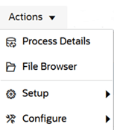
The Data Integration home page has undergone a subtle but powerful transformation. The familiar Actions menu has been reorganized into two new dropdowns: Setup and Configure.

The Setup menu is where you define the structure of your data environment. Think of it as mapping your maze before you start running:

  • Applications: Define your integration targets and sources.
  • Locations: Create and maintain locations for mapping.
  • Period Mapping: Align time-based data across systems.
  • Category Mapping: Manage application scenarios.
  • Query: Setup and modify data source queries.

Once your maze is mapped, it’s time to optimize your tools and security. This is where the Configure menu comes in:

  • System Settings: Control the behavior of your integration engine.
  • Security Settings: Safeguard access and permissions.
  • Agent: Manage the EPM Integration Agent settings.
  • Download Agent: Get the EPM Integration Agent software.

Just like the characters in Who Moved My Cheese? learned to adapt to their new reality, this menu redesign helps users adapt to their data environment more efficiently. By grouping actions based on context, users can find what they need faster and act with greater confidence eventually. Those of us who have switched to using the Data Integration UI will take a little bit to get used to it, but I think this is a small quality of life change that we will come to appreciate.

This update applies across business processes including Account Reconciliation, Planning, Tax Reporting, and more.

In the end, the cheese will always move. The question is: will you move with it?

EDM 25.09 Update – Request Monitoring Dashboard

In the September 2025 udpate (25.09), Oracle is adding a Request Monitoring Dashboard to EDM! Designed to enhance visibility and control over change requests, this dashboard empowers administrators, data stewards, and integration leads to streamline workflows and improve data quality across the enterprise.

The Request Monitoring Dashboard is a centralized interface that allows users to track and analyze open requests throughout their lifecycle. Whether you’re managing metadata changes, hierarchy updates, or complex multi-domain governance processes, this dashboard offers real-time insights into request activity, aging, bottlenecks, and contributor performance.

Key Features:

  • Lifecycle Tracking: Monitor requests by type, priority, workflow stage, and assigned contributors.
  • Custom Filters: Apply and save filters to focus on specific request attributes.
  • Dashboards:
    • Open Requests: View volume and distribution.
    • Active Owners: Identify who’s driving change.
    • Aging and Exceptions: Spot delays and anomalies.
  • Drilldowns & Drill-Across: Dive deep into request details or pivot to related metrics.
  • Export Capability: Download request activity for offline analysis or stakeholder sharing.
Request Monitoring Dashboard displaying open requests, active owners, aging, and exceptions. Features include request count by stage, open request distribution by application, and a snapshot of outstanding requests.
Sample Request Monitoring Dashboard image courtesy of Oracle

Why It Matters:

Managing change requests efficiently is critical to maintaining data integrity and operational agility. The dashboard helps teams:

  • Reduce request cycle time
  • Identify and resolve workflow bottlenecks
  • Improve exception handling
  • Enhance collaboration across business units

The Request Monitoring Dashboard isn’t just a new feature—it’s a strategic tool for proactive governance. By surfacing actionable insights and enabling smarter oversight, the Oracle EDM dev team continues to raise the bar for enterprise data management.

To find out more about this release, see the August 21 Oracle EPM Event by Rahul Kamath and Matt Lontchar here: https://community.oracle.com/customerconnect/events/606792-epm-whats-new-and-whats-coming-in-oracle-enterprise-data-management-edm-cloud

The EDM 25.09 features list can be found here: https://docs.oracle.com/en/cloud/saas/readiness/epm/2025/edm-sep25/25sep-edmcs-wn-f40991.htm

UPDATE: TLS 1.2 Deprecation Testing

After the 25.06 update was released, I did a quick test of a Windows 10 VM with Smart View and EPM Automate. The concern was that TLS 1.3 is supported only on Windows Server 2022 and Windows 11 and that our customers on older versions of Windows may have issues.

The test consisted of a Hyper-V Windows 10 Enterprise Evaluation VM with MS Office 365 installed. Using a test pod with the Vision Planning sample app installed, I tried to get in and start testing around 5:30 PM CDT (22:30 UTC) but the update wasn’t pushed yet. I tried a couple of times to run the “epmautomate rundailymaintenance” command to force the update, but no luck. After 6:00 PM CDT, I tried the rundailymaintenance again and it worked.

My Smart View ad-hoc template retrieved data just fine. Similarly, EPM Automate logged in after the update and told me it needed an upgrade. I ran the upgrade command and logged out. Even after the upgrade, EPM Automate logged in just fine.

Looks like a big nothing burger, which is the best result for us all. This was a test of end user tools, so I would still recommend all of you out there in EPM land to thoroughly test after this update just to make sure everything is good.

The coming TLS-pocalypse?

On Friday, June 6, 2025, the June (25.06) update will be released. Since at least April, Oracle has been communicating that TLS 1.2 will be deprecated in favor of TLS 1.3. Transport Layer Security is used to encrypt data transfers between computers, like between your company laptop and the Oracle EPM Cloud server. TLS 1.3 has stronger encryption algorithms to safeguard that data so it makes sense that we need to update to the later standard.

Browsers have supported TLS 1.2 and 1.3 for quite some time, so no worries there. There is some ambiguity in Oracle’s statement that causes me some concern, though. In the June Update, we have the following:

Transport Layer Security (TLS) protocol version 1.2 is no longer used for connections to Oracle Fusion Cloud EPM environments; all connections are made over TLS 1.3 only. This change requires you to use a browser that supports TLS 1.3. Additionally, you need to ensure that the operating system and EPM Clients (such as EPM Automate, Smart View, and EPM Agent) that you use support TLS 1.3. The newest version of EPM Clients, and many previous versions, already support TLS 1.3.
If you integrate on-premises EPM instances with Fusion Cloud EPM using Financial Data Quality Management Enterprise Edition (FDMEE), make sure to use FDMEE version 11.2.7 or newer because older versions do not support TLS 1.3.

Over the last 15 years, I think 80% or more of my work at customers has been done on Windows client machines and servers. Many times, customers have implemented their corporate standard OS version which might not be the latest available at the time of installation. Given that information, the third sentence of the Oracle Update notes seems to indicate that the OS also needs to support TLS 1.3.

After searching on some Microsoft sites, it seems that the only flavors of Windows to support TLS 1.3 are Windows 11 and Windows Server 2022. The concern is that customers who sometimes are a little slower to adopt new technology may experience issues trying to integrate with EPM Cloud products if they are on Windows 10 or older Windows Server versions that don’t support TLS 1.3. Customers who use FDMEE on-premises instead of the EPM Integration Agent still will also want to ensure their FDMEE has been upgraded to at least 11.2.7.

We will see what happens Friday night. Hopefully it’s as non-eventful as my New Year’s Eve in 1999.

Kim Kardashian can get my Essbase server updates

I had the great pleasure of presenting at Kscope17 on the power of Essbase CDFs.  At the end of my CDF presentation this year, I gave a live demonstration of a little CDF that is designed to spark the imagination.

In 2009, Matt Milella presented on CDFs at Kaleidoscope and talked about the top 5 CDFs that his team had created.  At the end, he showed a very cool demonstration of how his Essbase server could send out a tweet using a CDF. This was an amazing display and really inspired me to figure out how to create CDFs.

So, as an homage to Matt’s blog post about how Ashton Kutcher can get his Essbase server updates, I have created an updated version of the Twitter CDF. As Matt states, he used JTwitter back in 2009.  Unfortunately for me, Twitter has long since changed their authentication to use OAuth for security which means that JTwitter doesn’t work anymore.

I did some searching and found Twitter4J, an unofficial Java library for the Twitter API. This library handles the OAuth authentication as well as allows submitting of new status updates, sending direct messages, searching tweets, etc. Between Matt’s original Twitter code, the Twitter4J sample code, and some trial and error, I was able to get the library setup and created a Java class that could send my tweets.

  1. The first step was to download the Twitter4J library.  I added the twitter4j-core-4.0.3.jar file into my lib folder in JDeveloper and added it to my classpath.
  2. Next, I had to setup a new Twitter account (EssbaseServer2).
  3. Then, I went to http://twitter.com/oauth_clients/new and setup my application to get the OAuth keys needed for my code to authenticate.
    TwitterApp
  4. Once I gathered the keys, I put them into a .properties file called “EssbasTweet.properties”.  This file will be placed onto my Essbase server into the %EOH%/products/Essbase/EssbaseServer/java/udf directory.  Placing the file into the …/java/udf directory puts it into Essbase’s Java classpath and Essbase will be able to access the file when its needed.
    propertiesFile
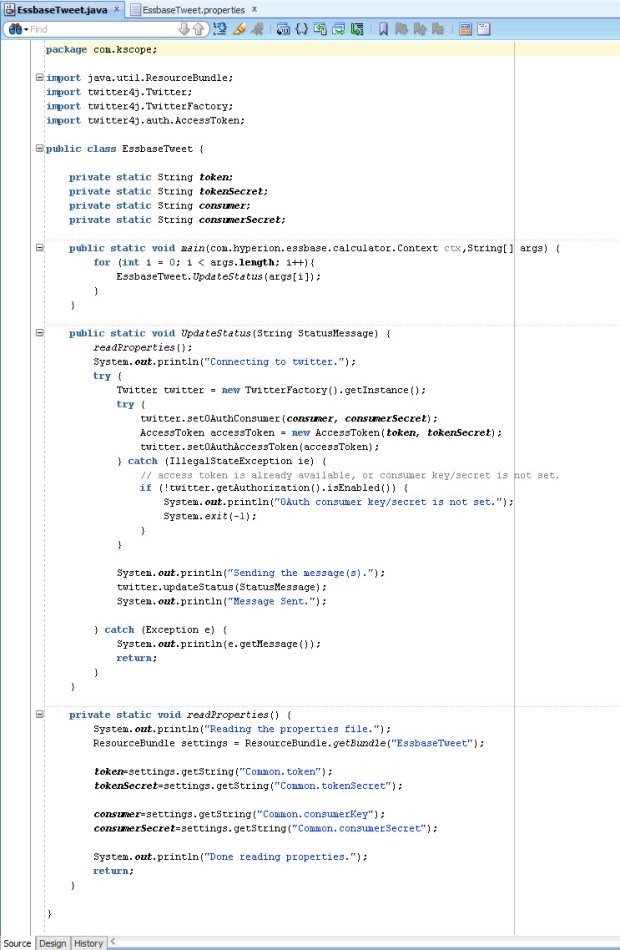
  5. Next, I wrote my code (based heavily on Twitter4J’s sample code), compiled it, deployed the code to a JAR and placed the JAR on the Essbase server.
    SourceCode
  6. I registered the CDF manually in EAS.
    RegisterCDF
  7. I was able to pretty much reuse Matt’s original calc script as he had it back in 2009 with the exception of using an @CalcMgr function instead of one of the older data functions.

Does it work? Well, go and check out the @EssbaseServer2 account for yourself.

While publicly tweeting your data might not be the best idea, hopefully this serves as a spark to ignite your imagination of the power of CDFs. Anything you can do in Java can be implemented in an Essbase calculation. Some attendees of my presentation were pretty excited about the possibilities of communicating with their users by submitting messages using Slack or updating a status on a SharePoint site. The possibilities are limited only by your imagination.

Thanks again to Matt for presenting on CDFs eight years ago. It definitely inspired me to learn more and hopefully this will inspire others to do the same.

There has been some uncertainty about the fate of CDFs with OAC and the Essbase cloud service, but never fear, CDFs are supported but they are limited to local CDFs. More on that in the future.

OAC Backup issue

I have found myself between projects for a couple of weeks which has given me a great opportunity to get hands-on with interRel’s OAC instance. It has been great to crawl around it, kick the tires, and get my hands dirty under the hood, so to speak.

One of the things we had issues with was running a backup at the service level. In OAC, there are two types of backups – service level and application level. The service backup is a full backup of all the runtime artifacts required to restore the service, such as the WebLogic domain, service instance details, and any metadata associated with your service. Basically, it’s like a snapshot of the VM that gets saved to your cloud storage instance (one of the prerequisites of OAC).

As I was playing with OAC and trying to figure out how to administer the product, I noticed that a monthly patch was available. Before applying the patch, I decided to take a service backup just to be safe in case anything happened during the patch.

From the OAC dashboard, I selected Administration. Then on the backup tab, I selected Backup Now.

OAC Backup Now

After 30 minutes or so, I came back to find out that my backup had failed. I attempted to run the patch anyway, but it does a backup first as well and so it failed again.

Eventually, I ended up submitting an SR with Oracle for help. Within about an hour or so, Oracle Support determined that it was likely that when we created our OAC database cloud instance that the USERS tablespace was not created.

My friend and co-worker, Wayne Van Sluys (http://beyond-just-data.blogspot.com/), ran into this issue at one of our OAC clients as well. Wayne sent over the information that I needed to get connected to our DBaaS instance via Oracle SQL Developer.

When you create an OAC service, one of the prerequisites is setting up the DBaaS service. The connection information you will need is accessible from the Database Cloud Service console. The Public IP address and connection string on the Service Overview page gives you what you need to know along with your “sys” schema name and password.

DBaaS connection info

In addition to this information, you also need to edit the Access Rules for the DBCS service to allow connections from outside on port 1521. I enabled this Access Rule for the service while I made the change.

DBaaS access rules

In SQL Developer, I was then able to set up the connection to our DBCS instance.

SQL Developer connection

With the connection made, I could then submit the SQL code to add the USERS tablespace using the “CREATE TABLESPACE” command. I will leave it to the reader to consult a DBA on the command and what options you should supply with the command.

After creating the USERS tablespace, the backups are now running successfully and I was able to apply the latest patch to our OAC environment.

Success

Success!

Do Oracle’s OOW cloud announcements signal the death of on-premises EPM?

This week at Oracle Open World, Oracle has announced more details around a few new EPM Cloud products (Essbase Cloud Services, PCMCS, and DMCS) in addition to their already existing stack of SaaS cloud services (PBCS, EPRCS, EPBCS, ARCS, and FCCS).
axeWith these new offerings added to their stable, is this the death of on-premises EPM as we know it?

Oracle’s stated direction of product strategy for the EPM products is to tap into unserved business users. EPM has been predominantly used by corporate finance departments from the beginning. At one point, Hyperion was marketed to CFOs and not CIOs because it could be run on an administrator’s computer under a desk without IT involvement. The evolution of EPM cloud is a return to the golden age of Essbase – easily created departmental applications that provide better analytic ability than Excel alone.

The EPM cloud products are really all about allowing easy adoption for non-traditional EPM users and providing rapid value to their customers. Spreadsheets still dominate at small to medium companies. The cloud offerings are really simplify life for those companies who struggle with maintaining servers and have a lack of technical skill at designing an optimized solution. With the EPM cloud products, it’s very easy to roll out a Workforce or CapEx application in EPBCS by sending out the URL and paying the monthly subscription fees. The cloud also allows the business users to be in the driver’s seat by not needing IT resources to get them up and running.

As we know, there is a long way to go yet on the EPM Cloud roadmap to get all of these products working well together. For instance, how exactly do we get data from our EPBCS application into ESSCS for additional reporting? How about my BICS dashboards using data from my ESSCS departmental cube or my PBCS budget data? It’s clear to see that with Oracle’s growth in the cloud and continued development of additional features and functions on the cloud products that these drawbacks will be remedied in time.

This whole cloud thing is just a fad, it will pass, right?

Even Mark Hurd stated during his keynote on Monday that the cloud is no fad, it’s a generational shift that is here to stay. Oracle has stated publicly that they fully intend to continue to support and develop EPM on-premises solutions. Matt Bradley, SVP for EPM and BI Development at Oracle, has said that Oracle expects most companies will enter into a hybrid cloud implementation if and/or when they decide to move their investments into the cloud. They have developed tools in DRM and FDMEE to support these hybrid cloud implementations. The shift to cloud computing is happening, but it doesn’t signal the immediate end of the line EPM on-premises. Once the cloud products have fully matured, there may continue to be valid use cases for on-premises EPM products going forward.

So, what is the future of my on-premises investment?

The market indicates that there is a healthy appetite for cloud solutions and all indications are that Oracle expects even large customers to eventually move their EPM investments to the cloud. While the on-premises products are still being developed, the availability of new on-premises versions has slowed down. For the last few years, we were blessed with several major releases of EPM software from 9.3.1 to 11.1.2.4. Oracle noted that the software release adoption cycle was about every two to three years, so we expect that the new software releases for on-premises will be more in line with those adoption cycles. We should expect to see some new features and functionality through Patch Set Updates to the latest code line in between major upgrades. Future on-premises releases will begin to showcase a simpler architecture to the components and focus on usability.

What should we do with our on-premises EPM environments now?

If you haven’t already upgraded to version 11.1.2.4, it is highly recommended. The 11.1.2.4 code line has some great features like better support for Essbase Hybrid Aggregation, improvements in HFM consolidations, FDMEE data synchronization between EPM applications, and the new Financial Reporting Web Studio. I have been on several calls with customers who are still working in old releases and the Classic Essbase add-in. It is time to move on and update those environments. If you have upgraded to version 11.1.2.4, it’s highly recommended to keep up with the latest Patch Set Updates on at least a quarterly basis. Sometimes applying the latest patches may cause some issues, so thorough testing of new patches is always recommended before implementing into production.

Staying on the latest release also allows companies to bridge from on-premises to cloud much easier. For example, as mentioned earlier FDMEE and DRM already support hybrid cloud implementations. Oracle has doubled-down at OOW 2016 on their assertion that cloud computing is the future. While on-premises EPM software isn’t going away any time soon, the cloud products are going to continue to mature rapidly. As the cloud products develop and integrations between them become more defined, more and more companies are going to see the benefits of moving their EPM investments into the cloud.