One of the toughest parts of training a new EDM user base is explaining why some properties apply to certain nodes and not others. As an administrator and the person who designed the system, it’s clear to me. As an end user, it can be frustrating to be told “that node doesn’t need every property, just ignore those fields.” Ignoring fields on a form just is not a great user experience.
In order to work around this, EDM developers have created separate node types within the same dimension which means each group of nodes gets its own set of properties. There are situations where that’s the right call, but it comes with baggage. Users need to decide which node type to create, administrators have more configuration to maintain, and the whole thing gets less intuitive.
That’s where the new Contextual Properties feature in the 26.09 release comes in.
What are Contextual Properties?
Contextual Properties let EDM decide which properties to display based on the value of a controlling property. Instead of showing every possible property to every user, the property pane adapts to the kind of node being maintained.
My favorite example is a Planning application where parent and base members share the same node type. We usually don’t want users assigning attribute values to parent members, since those attributes only mean something at the base level. With Contextual Properties, you define a context for Parent and Base, and each one only displays the properties it should.
How it works
The feature introduces the concept of a controlling property. This means the user defines the context values, associate properties with each one, and EDM updates the property pane when a user picks a value. Here’s what it looks like:
Create a new String property with the Basic subtype. I called mine “Context Property,” which is about as creative as I can get at the moment.
Add the property to a Node Type, then change the subtype to Context. The property can’t be derived or inherited.
On the Node Type, open the Context tab and assign your property as the controlling property.
Add your context values and assign the properties that belong to each one.
Create a new String property with a Basic subtype.
Once the property is added to a Node Type, the Subtype can be changed to Context.
On the Node Type, the Context tab allows the context to be assigned using your Context property. Select from the property list to assign the proper context. Users will only see properties that apply to that context on the property pane in viewpoints.
Let’s say I add two values to that property: Parent and Base. When the user selects Parent, only the parent-related properties appear. When they select Base, the leaf-member attributes show up.
The result is a property form that adapts to the node being maintained instead of forcing every node through the same experience.
Why This Matters
For me, the parent-versus-base node scenario is the most compelling use case. When we are managing EPM applications, there are certain properties that will apply to base nodes that really don’t need to be filled out or should not be filled out at the parent level.
This could also be applied to a “Site” or “Facility” node type. Certain types of sites or locations may need some properties and those values might not apply to a site of a different type. This is a perfect use case for those scenarios.
Better Validation Behavior
Custom validations with contextual properties are only going to get easier to create and maintain. Only properties associated with the active context are displayed and validated. This means required property checks only apply where they actually make sense. Parent nodes will no longer fail validations because they’re missing leaf-level attributes, and base members aren’t evaluated against rules intended for rollup nodes.
Administrative Benefits
The real value may be on the administration side. As mentioned earlier, many EDM implementations solved this problem by creating additional node types, node sets, and extra validation logic. Contextual properties promise to reduce the need for those workarounds.
One node type can now behave differently depending on the business context of the node. I’m a huge fan of keeping things simple where possible, and less configuration generally translates into less long-term maintenance, which is usually a win for me and my clients.
A Few Things to Know
There are a few implementation details worth understanding before rolling this into production.
Changing contexts does not remove existing property values. Hidden contextual properties are ignored during validation and request processing, but their values are preserved. This is similar to those “phantom” nodes when someone does a Remove action on a node with a single location. Just because you don’t see it doesn’t mean it’s not stored in the backend database.
Viewpoint downloads, extracts, and Universal exports include contextual property columns. However, values are only returned for properties that are active for the current context.
Imports behave differently than many people will expect. Replace and Reset load modes can process contextual property values regardless of the active context.
Final Thoughts
I think this is a great enhancement because it addresses a problem EDM administrators encounter on most implementations. For years, there was a tradeoff between keeping the model simple and keeping the user experience clean. Contextual properties are going to significantly reduce that tradeoff.
For me, that’s the real value of this enhancement. It isn’t just about hiding properties. It’s about making EDM easier for business users to navigate while reducing the need for administrators to create additional node types solely to control which properties are available for data entry.
Over the last couple of posts, we walked through what the EDM AI Change Assistant is, how it can be helpful, and seen some of what it can do so far. If experience has taught us anything, it’s that Oracle will continue to develop the tool and add additional features over time. I think the important thing to note is that the value of governance hasn’t decreased because we have AI to help out. If anything, I think it makes governance more important.
The assistant makes it easier to find your nodes, build queries, and create request items using prompts. Some of the careful clicking and dragging will hopefully be a thing of the past which is a fantastic improvement for admins and users.
But, as we saw in the last post, the AI Change Assistant doesn’t take credit or assume responsibility for the change, that’s on you. It’s not about whether the assistant can build a request, the question is whether that request is correct and/or should be submitted at all. That’s where having a human-in-the-loop is essential.
Back to governance for a second, if I can ask the assistant to make a bunch of changes and not review each one carefully that’s an open window for garbage to enter your system. If anything, I’ve learned that it’s going to be more important for us to start adding in additional custom validations to ensure that the business logic that lives in our heads is actually present in the system. This is the only way that we can flag when a user has given AI an incorrect prompt and violated a numbering sequence or naming convention.
While EDM contains data (metadata), it doesn’t know what humans do about the organizational politics or any future reorganization plans. Human reviewers bridge that gap. The last thing we want is AI to blindly accept what a user is asking it to do and/or humans allowing the system to arbitrarily make those changes without review.
Human-in-the-loop is a feature, not a bug. It’s exactly how the system should work to maintain integrity especially with your organization’s master data.
The Change Management Assistant is a significant step forward toward allowing administrators to spend less time constructing requests and more time evaluating their impacts. EDM has always been about managing change in a controlled manner. The arrival of AI doesn’t change that, it simply makes the need for human oversight and governance controls built into the system even more apparent.
Last post we covered what the EDM AI Change Assistant is and how it can help less technical administrators. Let’s face it, most people who work in EDM day-to-day aren’t doing that as their sole function in the business. Most likely, they are administrators for multiple financial applications and have many responsibilities beyond just getting the metadata correct each month. Join me while we see what this assistant, who I lovingly referred to as HAL, can do with some practical examples.
One thing to keep in mind when you are starting your conversation, try and keep your context clean each session. If you hide the chat window, it will retain where you left off from your conversation. If you pick back up and need to do something different, use the little eraser icon to reset the context.
As I mentioned last time, if you haven’t already enabled the Generative AI features, you will need to do that first before you can use my pal HAL. To do that, log into your EDM instance and navigate to Tools>Settings. Here you will want to check the box under Generative AI. Oracle doesn’t have this turned on by default, you must opt in. Before you do this, you may want to make sure that your IT security team has blessed using these tools with your company’s data.
Navigate to your choice of Viewpoints. Here I am using the wonderful Oracle sample EDM application. By the way, I want to give a huge THANK YOU to the Oracle team for allowing us to create an instance that has stuff pre-built. It’s a huge help when I am trying to do this kind of stuff or show a new customer how EDM works. But I digress, the sample application has plenty of viewpoints to choose from and more applications built than you can shake a stick at.
I started out in the Account Maintenance view because it has ERP and FCC viewpoints. I thought this might be a typical place to start for most administrators. I figured we may as well start with the most basic question, “What can you do?”
Here are some practical hands-on examples that an administrator might run:
Show me details and history for Entity C_305
Set Account Type = Expense for all accounts containing 6
list members with “x” in the name
As I played around, I took some screenshots to try and show the types of responses you can expect.
This slideshow requires JavaScript.
One of the above examples, I purposefully tried to give the system a prompt that I knew would result in a validation error. Old HAL went along with my request and sure enough, reported the error to me. I also tried to feed it a misspelled prompt to see if that would throw it off, but it knew what I was trying to do.
Each of my requests was done in the same viewpoint and the request items built upon each other. Each query built a new viewpoint query on the side and then created a spreadsheet of request items to add to the open request.
If the assistant can’t understand your intent from the original prompt, it will ask additional questions to refine the selection.
As I played with the assistant for a couple of hours, I learned a few things that I can pass along:
The assistant can’t create new requests on its own. A user must open a new request, and then the agent can add request items to the open request.
Security and governance are still enforced. If a delete action can’t be performed on a viewpoint, the AI assistant can’t add a delete request item.
As the AI thinks, it sends back a little log that gets collapsed. You can use the carat icon to expand the details and see the steps the AI took to get your result.
The assistant is helping YOU make the request, all of the changes are attributed to your user ID so be careful.
While this assistant has guardrails, it did give me some information when I posed a design question which was interesting. The Oracle FAQ on the assistant notes that it’s not intended for creating node types or other admin functions that aren’t currently documented.
It can’t do comparisons yet. You’re pretty much limited to building a node list with a query and then doing request actions against the query items.
You can take a hybrid approach. Maybe you open a request, tell the bot to do a few things and then finish up manually.
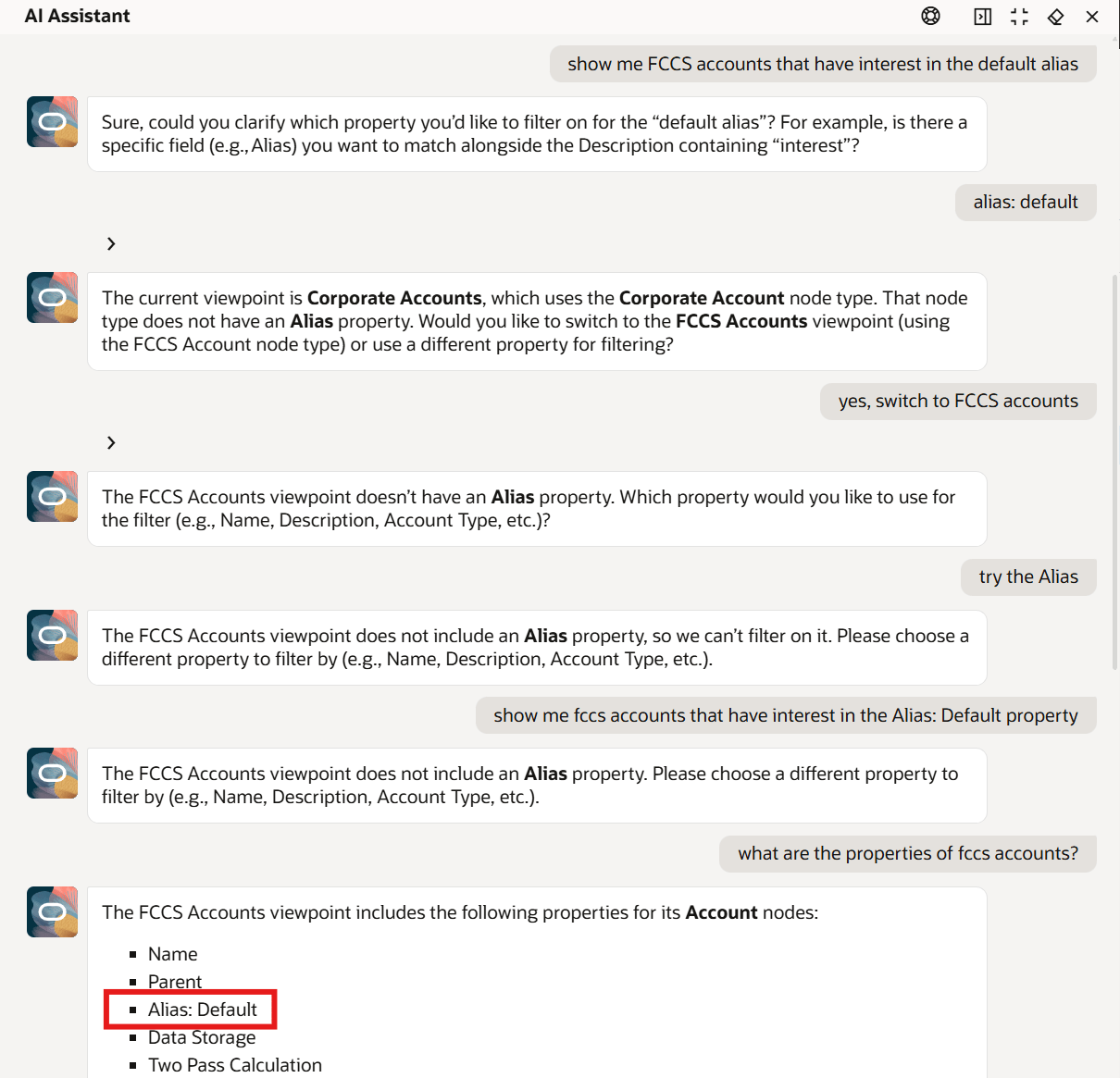
I had better luck getting the AI to recognize the property names when I put them in quotes. Maybe that was just me, but it wouldn’t understand Alias: Default until I told it ‘Alias: Default’.
When you’re querying nodes with the assistant, there are specific properties that are and are not indexed for searches. You can find those indexed properties with the little “one to many” symbol next to them in a viewpoint query as below.
To wrap things up, if you’ve mastered the UI and are an EDM expert this probably isn’t the tool for you, yet. I can whip up a Excel sheet with request items a lot faster than I can refine my prompts well enough to do any bulk updates. The power of being able to search nodes a little bit better is promising so I may keep playing a little bit.
The Oracle EDM product team didn’t just come up with a chatbot for EDM, they really built a different way to enable users to query nodes and create request items to work with the properties. All of the governance and security remains intact, the assistant is there to help users do those actions based upon the instructions the user provides.
Just because the assistant helps to build a technically correct request, that doesn’t mean that it’s an appropriate request. My buddy HAL doesn’t know your organization’s politics or policies or data ownership boundaries. It just knows the instructions that you gave it and checks that against your security and validations. I think the most important skill isn’t how to engineer your prompts better, it’s knowing that you are responsible for reviewing what you’ve just told the system to do. We will explore that topic more in the next post.
This will be a three part series covering the EDM Change Management Assistant. I was able to see a demo of this in action and it really changed my opinion on how useful it can be for administrators.
The past several years, working in EDM meant mastering the user interface; knowing the various shortcuts to jump to the screen that you want to be in, where to click, and how to build your request just right. With the Change Management Assistant, some of that knowledge won’t be used as frequently. Instead of navigating, you can just describe what you want.
The Change Management Assistant is a gen-AI chat interface that you can find in your viewpoints. Just click on the “Ask Oracle” button to get started. With this feature you can query nodes, explore metadata, generate and modify requests, perform bulk updates, and ask questions about requests all using natural language. If you don’t have this button, be sure you have enabled the AI features
When I first played around with this feature, I was only interested in finding nodes by their alias. As you may know, the search feature in EDM is not always super helpful when you’re looking for an account with “interest” in the alias. So when I tried a similar search with the Change Management Assistant (that’s a long name that I don’t want to keep typing, so let’s call it HAL) it didn’t bring back what I wanted and I threw up my hands and gave up. I didn’t realize that it could be used to build requests or do some of these other things, so I wanted to give you all a friendly bit of encouragement to keep trying it if that also happened to you.
Apparently, I still have some work to do to figure this thing out.
“HAL” isn’t just a convenience feature, it makes EDM more accessible to business admins. And those less technical admins are really the true audience of EDM.
So, what’s going on under the covers? “HAL” is actually dynamically building viewpoint queries based on your conversation. It also has the ability to build requests based on your asks. Once the assistant has created a request for you, it’s possible to jump out of the chat and refine the request manually. The other important thing to note is that this feature currently needs a human-in-the-loop to validate the request and submit it. Perhaps at a future date, we can have the assistant submit requests on our behalf, but for now, it’s safer to double check before letting the AI make hierarchy changes on its own.
Like the other Gen AI feature I mentioned in the last post, there is a prerequisite to enable AI features before you can use the assistant. There are some other guardrails on this feature to be aware of:
Permissions still apply – the assistant isn’t going to make any request changes that the user doesn’t have permissions to do themselves
English-first experience – in this early iteration, English is supported but “HAL” may respond in other languages depending on your user preferences Language selection
AI assistant won’t submit requests, yet
Despite my dated references, “HAL” is an assistant; it’s not autonomous. It’s not going to lock you out of the pod bay doors, as an admin you still have full control. And if you haven’t seen Kubrick’s “2001: A Space Odyssey,” none of that makes any sense to you.
Now that we have covered what the “Ask Oracle” button is all about and what it’s used for, the next post will go into some practical usage examples hopefully with some great success.
Oracle continues to add AI to its SaaS offerings including Oracle EPM products. They have been releasing AI features since 2024. Just to recap on some of the EPM AI features currently available:
IPM Insights to generate a narrative summary on an insight or group of insights
PCM Agent to assist with workflow tasks
Narrative Reporting generative AI features for commentary within report packages
Advanced Predictions in Planning and FreeForm
Predictive Cash Forecasting
As of the 12.25 release, Oracle added the EDM application registration assistant to generate properties
I had a chance to test drive the EDM GenAI feature while building a prototype for a customer recently and it is amazing. This is my “Tom Cruise on the couch” moment for EDM.
If you’re not setting up a new application and are in maintenance mode in your applications, maybe you don’t even care about this update. But, if you’re prototyping a new app or thinking about expanding your EDM application into other master data domains like products, customers, vendors, things like that, this update saves a ton of time.
Building a custom application can involve some tedious work. Setting up each and every property takes a couple of minutes; you have to enter in the property name, identify the data type for the property, etc. But, with this generative AI application registration assistant, it can evaluate a .csv file of a bucket load of properties and the first 10 rows of data to identify the property names and data types for you. This came in handy for me with a customer’s data set that had 173 properties.
Enable AI
To get started using Generative AI in EDM, the first thing you need to do is enable the feature in the application Settings. Just check the box. No restart of the service is needed. That’s literally all there is to do.
Now that AI has been turned on, you’d expect some confetti on the screen or something, but nothing.
Is this thing on?
So, now that we have enabled AI how do I use this feature? Oracle’s docs say:
To generate properties using a sample file, you must be on the Properties for Dimension Node Type page. You access this page when you perform any of the following tasks:
After you add an existing property, create a custom property, or modify a property.
Maybe it’s my midwestern, plain-speaking roots or something, but I couldn’t decipher that. So, my next step was to try and play with it to figure it out.
I went into the Node Type and played around in there with properties but didn’t see anything different.
So, I tried to add a new Node Type from the Node Type card in the Information Model, but that didn’t allow me do anything different in the Properties window either.
Then, I went into the application by selecting Modify Registration and navigated into my Node Type that I was trying to edit.
Success!
I already gathered a data file with electric vehicle data (thanks Uncle Sam), so with that file in hand, I clicked on Generate to add my custom properties.
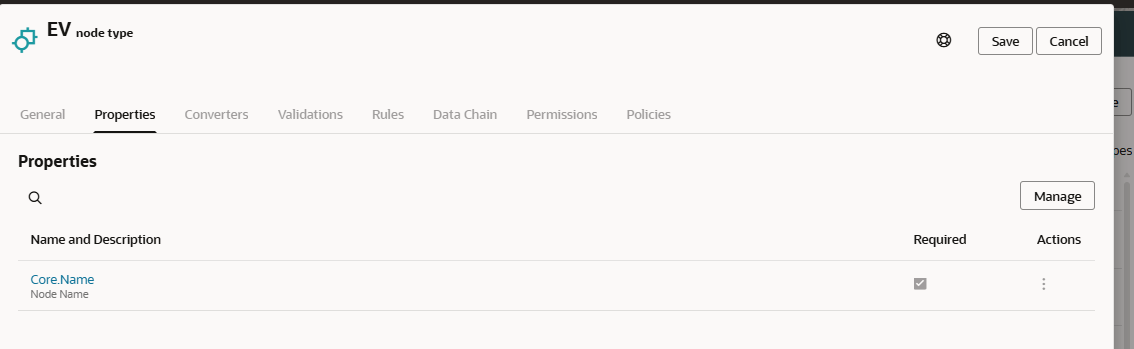
I clicked the “Drag and Drop” button and it allowed me to browse to find my EV file. The GenAI assistant reads the headers and the data rows to determine the Property Name and Data Type as well as suggest what level (Node or Relationship) the property should have. If you don’t like what it selected, click the Edit button to change the values.
In my case, I wanted my VIN property to be the Name. I tried to tell the application this is my Name, but as you may have noticed in the earlier pictures, the Name property already exists. In this case, I used the Actions “delete” icon to remove that property.
Next, I noticed things like Postal Code and Model Year were set to Integer. I didn’t want the system to try and put commas as thousands separator in those fields, so I changed them to Numeric String. Of course, with any AI usage, there should be a human in the loop to ensure that AI is handling things properly.
After clicking Save, and finishing up my Modify Registration wizard, I could see the properties were built in my Node Type.
Lessons Learned
File preparation can go a long ways in saving you time fixing some AI mistakes here. You want to have 10 or so rows of sample data so the system can determine the Data Type and Level for the properties. Your headers should be labeled how you want them to appear in EDM and you can specify your property order in the file as well. Adding prefixes to your properties and clustering them together might make it easier when you create property groups as well.
As you can see, this GenAI feature is assistive, not automation. It provided a great deal of time savings to me as a developer, but I can’t blindly trust the system to choose the correct data types for each property. This feature accelerates setup, but doesn’t replace design. It’s still important to define naming standards as you can see with the long names from my data file.
While this is dramatically faster than building all properties from scratch, we still need to plan for multiple refinement cycles and time to adjust those AI-generated properties.
This new GenAI assistant is ideal for new applications or domain onboarding in EDM. This could help out with new implementations, when doing M&A activity, re-platforming enterprise data, or metadata rationalization projects.
With the first calendar quarter of 2026 in the books, Oracle is ready to resume the monthly update schedule for EPM applications. Since we haven’t had a normal update schedule for a few months, the EDM development team has a backlog of updates that will finally be automatically pushed this month. The descriptions of the features are on Oracle’s site and you can find that link at the bottom if you haven’t seen it already.
Spotlight Features:
In the EDM list of spotlight features from Oracle we see the following:
A generative AI assistant is now available within Universal application registration to quickly create and configure properties for node types based on sample data files.
Hierarchy viewpoints can now be optionally visualized in an organization chart format rather than the standard tree format used by default.
Global connections can now be defined to Microsoft Azure Blob Storage in order to share data with external applications and processes from a centralized storage location in a Microsoft Azure cloud environment.
Gen AI Assistant:
This sounds like a very cool feature to help speed up the development process. My take is that EDM build phases can sometimes be a little tedious with all of the clicks needed to wire things up correctly, so this is a good first start to try and streamline that process. This is obviously a first iteration, so I’m excited for the future when you can just point EDM to an FCC or Planning application and have the AI assistant read the dimensionality and then you can choose which dimensions to set up in EDM. On top of that, just imagine you can say to an AI assistant, “I have this ERP system here’s a file with my segments. Here’s the URL for my EPM application. Build two EDM apps for the metadata management and create a mapping viewpoint to manage the data integration maps as well.”
Viewpoints in Tree format:
I have seen this functionality and I am used to seeing things in the default visualization so that makes more sense to my brain. I’ll have to play around with the tree view to see how useful it will be for me.
Azure Blob Storage connection:
Azure Blob Storage connection is a great addition. This especially makes sense as more and more organizations are seeing the benefit of using EDM for non-financial domains. At a prior employer, we were mastering employee roles that were fed into Azure Blob Storage which eventually fed HR systems. The ability to send an extract direct to Azure Blob Storage will streamline that process and make some of the automations created using EPM Automate and WinSCP unnecessary. It will streamline the integrations which is a win in my book.
Other Updates:
New Validations for FCC applications:
There are some new validations that will be added to FCC applications for the Account dimension. These will be enabled by default on new EDM FCC applications, but need to be manually enabled on existing applications. These will replace some custom validations that customers have created. It’s great to see that some of the features that customers have asked for in the Cloud Customer Connect Idea Lab coming into reality.
Address verification:
When importing addresses, customers with Oracle’s address verification service can ensure that good addresses are loaded into EDM from the beginning. Data cleanliness is very important when mastering Customer or Supplier dimensions, so this is a great addition to the product.
OAuth2 Authentication for Oracle cloud ERP and Financials connections
OAuth token based authentication is preferred for most IT shops since it doesn’t require maintaining a password. This is great news that token authentication is being implemented more and more across the Oracle stack.
Of course, these are just my opinions. If you have a different perspective, I’d love to hear it. Sharing knowledge is one of my core values and as the saying goes, a rising tide raises all boats.
The first car I ever bought was a 1964 Chrysler Newport. It was a strange car for a 16-year-old in 1996, but it was amazing. The smell of the interior. The feeling of that big block 361 cubic inch wedge V8. The satisfying “clunk” when pushing the buttons to change the gear. The “Forward Look” years at Chrysler design led to space-age choices like pushbutton gear selections on their automatic transmissions, as well as futuristic styling and gauges that glowed green. That car met an unfortunate demise when a guy swerved to miss someone who ran a stop sign, and he caved in the rear quarter panel. I think my beautiful tank became a demolition derby car after that.
My first car was just like this.Push button selector on the dash
As some may know, I started working on Essbase 20 years ago. As an Essbase administrator, I loved to automate much of my tasks, even using Hyperion Application Link (HAL) to alert me when new files appeared to be loaded during month-end. As the build phase wound down and I moved into support and maintenance, I found time on my hands during the workday. My love of old cars and lack of knowledge about them led me to an internet forum for hot-rodding misfits who pride themselves on upholding the tradition of hot rods and custom cars – as long as they are pre-1964. You see, 1964 was the birth year of the Mustang, and the years that followed became the muscle car era. These hooligans did not mess around with muscle cars, nor VW bugs, but that’s a different story.
I tried to restore old cars over the years. I bought a 1964 Chrysler Newport convertible with the intention of restoration, but that project was much bigger than I was able to tackle at the time. My next project was a 1951 Plymouth Cambridge. My goal was to chop the top and change the suspension using airbags to get it low. My Mopar (Dodge, Chrysler, Plymouth) habit kept me choosing odd cars that really didn’t have any support in the aftermarket, so I ended up learning how to fabricate and weld. I started with floor pans on the Newport convertible and eventually moved on to welding the top of the Plymouth.
Unfortunately, the Plymouth project eventually stalled and I gave up. Around this time, I started working as a consultant. My wife and I decided that we should move closer to a major airport to make my work travel easier and we settled on the Dallas/Fort Worth area. With an impending move and sale of our home in small town Iowa, I pretty much gave my car project away and had an auction to sell off most of my other car parts.
That house listing came around the time the entire housing market collapsed. Our house was listed for over a year. Without a project car, I started to get restless and needed some outlet. I needed another project, but I was going to finish this one. I wanted something a little easier that didn’t need to be as nice as a custom car. That led me to build a hot rod. It could be a little rough around the edges since that just adds to the character. I didn’t want to mess with chopping a top again, so that led me to looking at roadsters. In January of 2012, I bought a Moleskine journal and started documenting the process just to have an outlet for the things that were in my brain. I sketched what I thought the end result might look like and how I wanted to set up my suspension.
And so, it begins…
At this point, I had two daughters and was expecting to move to Texas, so I couldn’t really make any major purchases unless they were a great deal. Before the move, I acquired a full 1940 Ford front suspension: axle, spindles, brakes, drums, wishbone, and front spring. This is a lot of components for $275 and quite a steal. Then, I needed a frame for whatever car I decided to build, so I bought 24 feet of rectangular steel tubing in Iowa as well shortly before the move.
Of course, the house was finally sold and we moved to Texas around August of 2012. By this point, I had pretty much settled on a 1926-1927 Model T roadster. If you know hot rods, you know that 1932 through 1934 Fords are very desirable, but you have to pay to play with those. Model As are nice, but I didn’t like the 1928-29 cowl and I figured a 1930-31 A would be out of my price range. Model Ts aren’t the most likely selection for a hot rod, but there were a few of them in the 1950s and 60s.
Then came the new homeowner stuff. Painting, setting up kids’ rooms, and getting settled in. In April of 2013, I went to a large swap meet hoping to find a fiberglass body. I walked about 7 miles that day up and down the rows and found my body – an original steel roadster in rough shape. Missing part of the subframe that the body attaches to, minus one door, and plenty of rust. But, I am thrifty and the asking price was $500. After agreeing to $350, I loaded the body onto my trailer and headed home.
This body is obviously very rusty and I am missing some critical components. I took the body completely apart panel by panel so that I could do rust removal via electrolysis. In the mean time, I bought some lumber to build a rudimentary frame table and began work on laying out my frame. In 2013, I found another body in South Dakota on eBay that had nice doors and a solid bottom half, but the top was beat up – the opposite of my body. So, I rented a Dodge Caravan with the fold-flat seats and drove to fetch that body.
During the frame build, I found a 1966 Dodge 361 cubic inch big block for sale in Oklahoma. This is the same type of engine that I had in my first car. I was able to grab that as well as a 1963 push button automatic from Dallas. I found a 1969 Roadrunner rear axle that had a 3.23 gear ratio in it and found some rear brakes from a guy who lives close. I bought an original driveshaft on eBay that I had to cut apart and shorten as well as many shipments from Speedway Motors and Summit Racing.
Eventually, I had pieced together something that looked like a car. I drove it around the neighborhood a couple of times to get a feel for it, but there were some issues to be fixed. I had to get a different torque converter for the transmission as it didn’t drive correctly which required buying a later parts transmission and swapping out the input shaft. The three Holley 94 carburetors made the engine way too rich, so I switched to a four-barrel carb to make things easier. At this time, I decided to paint the car, so it all came apart in 2021.
I primed the car and started body work in my garage which is messy business. There was a family who moved out down the block and set their leather loveseat on the curb that had been clawed by their cats. That couch made its way into my garage and was skinned and put away until I was ready for the interior. Once the body was almost done in primer, I realized that trying to perfect this 100 year old body and paint it shiny would take a long time, so epoxy primer as a topcoat is what I chose.
I casually would check out Facebook Marketplace hoping for a deal on an upholstery sewing machine and found an amazing deal a couple of hours away. I grabbed cash and came back with an Adler walking foot sewing machine which is an industrial machine great for sewing leather and other thick fabrics. Around January, I had the body back together and wired again and decided to work on the upholstery. It was a steep learning curve, but the upholstery came out good enough for this old buggy.
So, over 13 years after my original idea began, I now officially have a running and driving 1960s inspired hot rod. This is the longest project I have ever tackled and without the patience of my wife and family it would not have been possible.
Oddly enough, the lessons I learned turning wrenches in the garage kind of map to how I approach Oracle EPM projects.
1. It All Starts With a Clear Vision
Every successful EPM implementation begins the same way a successful car build does: with a vision.
When I started my roadster, I knew what I wanted the end state to look like. Not just cosmetically, but mechanically, structurally, and emotionally. I could see the car finished, even on days when it was nothing more than a bare frame. And of course, as any true hot rodder will tell you, I sat in it and made engine noises every chance I got.
EPM projects require that same clarity. I like to start with the end in mind. This helps us make sure we are building the necessary features to enable that reporting or dashboard that is the end result. A well-defined future-state with data flows, integrations, and user experience, all baked in is what keeps the team aligned. Without it, both cars and projects drift into scope creep, wasted effort, and frustration.
2. Budgeting: Reality Meets the Ideal
Anyone who’s ever built a custom car knows the truth: You will spend more than you expect.
Not because of mismanagement, but because as you get deeper into the process, you see opportunities to improve things you hadn’t originally considered. The same is true in EPM.
Budgeting is about:
identifying what’s essential,
understanding what’s optional,
and planning for the unexpected.
Sometimes, that chrome windshield that you originally didn’t want starts to make sense when you see the features that it provides. And, while you’ve got things apart, you may as well make it as nice as you can. I’m sure EPM consultants can relate to that in their projects.
3. Change Management Matters, In the Garage and in the Office
When you work on a car for over a decade, technology evolves. Parts that didn’t exist when I started became the new standard, like the electric parking brake I installed after seeing how nice the one is in my wife’s Honda. I can’t say that my vision changed but, I changed as time went along.
To avoid rework, you must learn to communicate and adapt.
Change management in EPM projects isn’t just formal documentation; it’s helping stakeholders understand why changes are needed, how they support the long-term vision, and what the impacts will be. Sometimes that involves moving the budget a little. Sometimes it means that users might need to change their business process a little.
Whether it’s a new parking brake system or a redesigned planning process, people need time and clarity to adjust.
4. Resource Constraints Are Real
My hot rod project had two ever-present constraints:
Time – The hours you want to spend are never the hours you actually have. Ability – Some tasks stretch your skills; sometimes you have to learn a lot before you can even begin to develop a skill.
Oracle EPM projects follow the same pattern. Teams juggle:
competing priorities
limited SME availability
skill gaps
integration dependencies
You don’t succeed by pretending constraints don’t exist. Teams can succeed by planning for those constraints and setting the schedule around them.
5. Waiting for the Right Tools
I had the leather from that roadside couch for over two years before I found the right deal on the right sewing machine. Sometimes waiting is the smartest move; forcing progress with the wrong tools usually leads to expensive cleanup. My wife’s Project Runway household sewing machine wasn’t going to cut it when sewing through up to four layers of leather.
EPM programs experience similar bottlenecks:
waiting for upstream system modernization
waiting for data governance decisions
waiting for cloud capabilities to mature
waiting for internal skill development
Patience isn’t the opposite of progress. Sometimes it is progress.
6. Agility: Adjusting Priorities Without Losing the End State
When you’re 13 years into any project, life happens. Family, work, budget shifts, and other priorities interrupt even the best-laid plans. What kept the project moving forward was the ability to adjust short-term priorities while keeping the long-term vision intact. That’s textbook agile thinking.
In any project, we should focus on:
breaking down the vision into flexible increments,
delivering value continuously,
and being ready to pivot without compromising the destination.
Agility keeps the journey alive.
7. Sticking With It: The Power of Completion
There’s nothing like turning the key on a car you built with your own hands. I drove around just today checking some rear suspension changes and clocked mile number 35. The sound, the vibration, the smells; it’s deeply rewarding.
But the moment that surprised me most? The reactions from people on the road. The thumbs up. The smiles. The nods of approval.
That feedback loop makes every late night, busted knuckle, and sliced hand feel worthwhile.
EPM projects are no different. When users finally experience the system with faster reporting, cleaner data, and simpler processes, their satisfaction validates the effort. Their reactions are the equivalent of those thumbs up on the highway.
It reminds you that completion isn’t just a milestone. It’s a celebration. And just maybe, that completion doesn’t mean that it’s actually done, it could just be Phase 1.
When designing an EPM application like Oracle FCC (Financial Consolidation and Close), it’s tempting to try to fit all data into a single cube. We have several system dimensions like Movement and Data Source to play with along with the four Custom dimensions. But forcing data into places it doesn’t belong can lead to a tangled mess of interdimensional irrelevance, hurting both performance and usability.
What Is Interdimensional Irrelevance?
Interdimensional irrelevance occurs when dimensions intersect in ways that don’t make logical or business sense. This leads to sparse intersections, bloated cube sizes, and confusing user experiences. For example, trying to report on a statistical driver against a legal entity that doesn’t use it creates meaningless intersections that slow down processing and clutter reports.
Our Design Challenge
We faced a situation where certain data elements, while important, didn’t naturally fit into the FCC hierarchy. These were supplemental metrics and drivers that were useful for analysis but didn’t belong in the core consolidation structure. Initially, we considered shoehorning these members into the existing hierarchy, but this quickly proved problematic:
Adding non-consolidation data to FCC can introduce unnecessary complexity.
Sparse data intersections may slow down calculations and retrieval.
Mixing supplemental and core financial data risks confusion and misinterpretation.
Additional supplemental requirements might create what was coined as a “dumpster dimension”
The Solution: A Supplemental Application
To maintain clarity and performance, I would argue that offloading these supplemental data elements into a separate Planning FreeForm application is a better move. In the on-premises days, we would spin up little analytic cubes all over the place to hold data that really didn’t make sense in a larger cube. I don’t see why we wouldn’t do something similar with EPM Enterprise Cloud customers as well. In my eyes the benefits are:
Preserve the integrity of the FCC hierarchy by keeping it focused on core financial data.
Optimize performance by reducing sparsity and irrelevant intersections.
Enable targeted analysis in the supplemental cube without compromising the main application.
Stitch the reporting together in Narrative Reporting and/or ad-hoc analysis with Smart View.
This approach gives the flexibility to design each cube for its specific purpose, while still allowing for integration where needed pushing data through data maps or integrations.
Key Takeaways
Don’t force-fit data into hierarchies where it doesn’t belong.
Use supplemental applications to isolate non-core data.
Design with both performance and user experience in mind.
Interdimensional relevance should be a guiding principle in Essbase architecture.
When we respect the boundaries of dimensional logic, we can create cleaner, faster, and more maintainable solutions.
In the November 2025 update for Oracle EPM, we will see some additional changes to the Data Integration Actions menu. A new “Other” actions folder will be added with the Report Execution and System Maintenance Tasks options. This is another quality of life update that brings us one step closer to parity between Data Integration and Data Management. To put it plainly, if you’re not using the Data Integration UI in Oracle EPM, you should get familiar with it.
EDM didn’t have any new updates this month, but Oracle has a new video on the Consolidation Requests. Consolidation requests allow the combination of multiple in flight requests into a single consolidation request for approval by a change governance committee. Requests can only be consolidated from the same view in EDM. The consolidation of requests can help simplify the approval by a change board. If part of a consolidation request needs to be pushed back, the consolidation request can be discarded. For more information, see the video here: https://youtu.be/vujzO5bQsi4
In Dr. Spencer Johnson’s 1998 bestseller, Who Moved My Cheese?, four characters navigate a maze in search of cheese. The book’s main themes are that change is inevitable and that we must anticipate, adapt, and embrace it to be successful in work and life.
Fast forward to the 10.25 Oracle EPM update, and we find ourselves in a similar maze. This time, the “cheese” is the data management Action menu items. And yes, they are about to be moved.
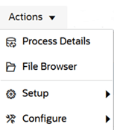
The Data Integration home page has undergone a subtle but powerful transformation. The familiar Actions menu has been reorganized into two new dropdowns: Setup and Configure.
The Setup menu is where you define the structure of your data environment. Think of it as mapping your maze before you start running:
Applications: Define your integration targets and sources.
Locations: Create and maintain locations for mapping.
Period Mapping: Align time-based data across systems.
Category Mapping: Manage application scenarios.
Query: Setup and modify data source queries.
Once your maze is mapped, it’s time to optimize your tools and security. This is where the Configure menu comes in:
System Settings: Control the behavior of your integration engine.
Security Settings: Safeguard access and permissions.
Agent: Manage the EPM Integration Agent settings.
Download Agent: Get the EPM Integration Agent software.
Just like the characters in Who Moved My Cheese? learned to adapt to their new reality, this menu redesign helps users adapt to their data environment more efficiently. By grouping actions based on context, users can find what they need faster and act with greater confidence eventually. Those of us who have switched to using the Data Integration UI will take a little bit to get used to it, but I think this is a small quality of life change that we will come to appreciate.
This update applies across business processes including Account Reconciliation, Planning, Tax Reporting, and more.
In the end, the cheese will always move. The question is: will you move with it?