EPM

Avoiding Interdimensional Irrelevance in EPM Cloud: A Smarter Design Approach

When designing an EPM application like Oracle FCC (Financial Consolidation and Close), it’s tempting to try to fit all data into a single cube. We have several system dimensions like Movement and Data Source to play with along with the four Custom dimensions. But forcing data into places it doesn’t belong can lead to a tangled mess of interdimensional irrelevance, hurting both performance and usability.

What Is Interdimensional Irrelevance?

Interdimensional irrelevance occurs when dimensions intersect in ways that don’t make logical or business sense. This leads to sparse intersections, bloated cube sizes, and confusing user experiences. For example, trying to report on a statistical driver against a legal entity that doesn’t use it creates meaningless intersections that slow down processing and clutter reports.

Our Design Challenge

We faced a situation where certain data elements, while important, didn’t naturally fit into the FCC hierarchy. These were supplemental metrics and drivers that were useful for analysis but didn’t belong in the core consolidation structure. Initially, we considered shoehorning these members into the existing hierarchy, but this quickly proved problematic:

  • Adding non-consolidation data to FCC can introduce unnecessary complexity.
  • Sparse data intersections may slow down calculations and retrieval.
  • Mixing supplemental and core financial data risks confusion and misinterpretation.
  • Additional supplemental requirements might create what was coined as a “dumpster dimension”

The Solution: A Supplemental Application

To maintain clarity and performance, I would argue that offloading these supplemental data elements into a separate Planning FreeForm application is a better move. In the on-premises days, we would spin up little analytic cubes all over the place to hold data that really didn’t make sense in a larger cube. I don’t see why we wouldn’t do something similar with EPM Enterprise Cloud customers as well. In my eyes the benefits are:

  • Preserve the integrity of the FCC hierarchy by keeping it focused on core financial data.
  • Optimize performance by reducing sparsity and irrelevant intersections.
  • Enable targeted analysis in the supplemental cube without compromising the main application.
  • Stitch the reporting together in Narrative Reporting and/or ad-hoc analysis with Smart View.

This approach gives the flexibility to design each cube for its specific purpose, while still allowing for integration where needed pushing data through data maps or integrations.

Key Takeaways

  • Don’t force-fit data into hierarchies where it doesn’t belong.
  • Use supplemental applications to isolate non-core data.
  • Design with both performance and user experience in mind.
  • Interdimensional relevance should be a guiding principle in Essbase architecture.

When we respect the boundaries of dimensional logic, we can create cleaner, faster, and more maintainable solutions.

Oracle EPM AI features deliver on promises from long ago

I have accepted the fact that I am getting old (or is it “more experienced”?). At this point, I have been working on and around Oracle EPM products for almost twenty years. In the early 2000s, I was getting data from Hyperion Enterprise before we installed Essbase to do reporting. I dove into Essbase and began learning as much as I could. Once I reached a point where I felt I had done everything I could at my position as an administrator, I moved into consulting in 2010 to continue developing myself and learning more. As part of that, I took some training on OBIEE to help support customers with BI installs.

My point is, for 15+ years (maybe 20) EPM and BI users have heard about the promise of self-service BI: empowering users to analyze and visualize data independently. I remember hearing this in my OBIEE training and it was exciting to think about users digging into the data to answer business questions.

The thing with BI products is that there has to be someone technical to connect all of the data sources on the back end. It takes a special someone to figure out the right strings to pull to get all of those data sources normalized and linked up so that end users can do their reporting and analysis. It may be my bias as an implementer, but I don’t know how far users go past the initial dashboards that get created. I certainly hope it’s more common than I have seen.

As I sat in the Kscope Sunday Symposium presentations by Oracle product management and heard about all of the AI features coming to Oracle EPM, it dawned on me that all of the amazing things that I imagined 15 years ago will soon be possible and more accessible than ever. Users will soon be able to to chat with the AI built into Oracle EPM products and get visualizations fed back to them. To recycle an old sales pitch, analysis at the speed of thought is about to be real.

I am looking forward to seeing the developments in Oracle EPM products and I’m excited to see what our customers do with them. You can find the current AI features available in Oracle EPM products here: https://docs.oracle.com/en/cloud/saas/fusion-ai/aiafl/epm-features-with-ai.html. That list is about to get much longer. These are exciting times we live in.

UPDATE: TLS 1.2 Deprecation Testing

After the 25.06 update was released, I did a quick test of a Windows 10 VM with Smart View and EPM Automate. The concern was that TLS 1.3 is supported only on Windows Server 2022 and Windows 11 and that our customers on older versions of Windows may have issues.

The test consisted of a Hyper-V Windows 10 Enterprise Evaluation VM with MS Office 365 installed. Using a test pod with the Vision Planning sample app installed, I tried to get in and start testing around 5:30 PM CDT (22:30 UTC) but the update wasn’t pushed yet. I tried a couple of times to run the “epmautomate rundailymaintenance” command to force the update, but no luck. After 6:00 PM CDT, I tried the rundailymaintenance again and it worked.

My Smart View ad-hoc template retrieved data just fine. Similarly, EPM Automate logged in after the update and told me it needed an upgrade. I ran the upgrade command and logged out. Even after the upgrade, EPM Automate logged in just fine.

Looks like a big nothing burger, which is the best result for us all. This was a test of end user tools, so I would still recommend all of you out there in EPM land to thoroughly test after this update just to make sure everything is good.

The coming TLS-pocalypse?

On Friday, June 6, 2025, the June (25.06) update will be released. Since at least April, Oracle has been communicating that TLS 1.2 will be deprecated in favor of TLS 1.3. Transport Layer Security is used to encrypt data transfers between computers, like between your company laptop and the Oracle EPM Cloud server. TLS 1.3 has stronger encryption algorithms to safeguard that data so it makes sense that we need to update to the later standard.

Browsers have supported TLS 1.2 and 1.3 for quite some time, so no worries there. There is some ambiguity in Oracle’s statement that causes me some concern, though. In the June Update, we have the following:

Transport Layer Security (TLS) protocol version 1.2 is no longer used for connections to Oracle Fusion Cloud EPM environments; all connections are made over TLS 1.3 only. This change requires you to use a browser that supports TLS 1.3. Additionally, you need to ensure that the operating system and EPM Clients (such as EPM Automate, Smart View, and EPM Agent) that you use support TLS 1.3. The newest version of EPM Clients, and many previous versions, already support TLS 1.3.
If you integrate on-premises EPM instances with Fusion Cloud EPM using Financial Data Quality Management Enterprise Edition (FDMEE), make sure to use FDMEE version 11.2.7 or newer because older versions do not support TLS 1.3.

Over the last 15 years, I think 80% or more of my work at customers has been done on Windows client machines and servers. Many times, customers have implemented their corporate standard OS version which might not be the latest available at the time of installation. Given that information, the third sentence of the Oracle Update notes seems to indicate that the OS also needs to support TLS 1.3.

After searching on some Microsoft sites, it seems that the only flavors of Windows to support TLS 1.3 are Windows 11 and Windows Server 2022. The concern is that customers who sometimes are a little slower to adopt new technology may experience issues trying to integrate with EPM Cloud products if they are on Windows 10 or older Windows Server versions that don’t support TLS 1.3. Customers who use FDMEE on-premises instead of the EPM Integration Agent still will also want to ensure their FDMEE has been upgraded to at least 11.2.7.

We will see what happens Friday night. Hopefully it’s as non-eventful as my New Year’s Eve in 1999.

Kim Kardashian can get my Essbase server updates

I had the great pleasure of presenting at Kscope17 on the power of Essbase CDFs.  At the end of my CDF presentation this year, I gave a live demonstration of a little CDF that is designed to spark the imagination.

In 2009, Matt Milella presented on CDFs at Kaleidoscope and talked about the top 5 CDFs that his team had created.  At the end, he showed a very cool demonstration of how his Essbase server could send out a tweet using a CDF. This was an amazing display and really inspired me to figure out how to create CDFs.

So, as an homage to Matt’s blog post about how Ashton Kutcher can get his Essbase server updates, I have created an updated version of the Twitter CDF. As Matt states, he used JTwitter back in 2009.  Unfortunately for me, Twitter has long since changed their authentication to use OAuth for security which means that JTwitter doesn’t work anymore.

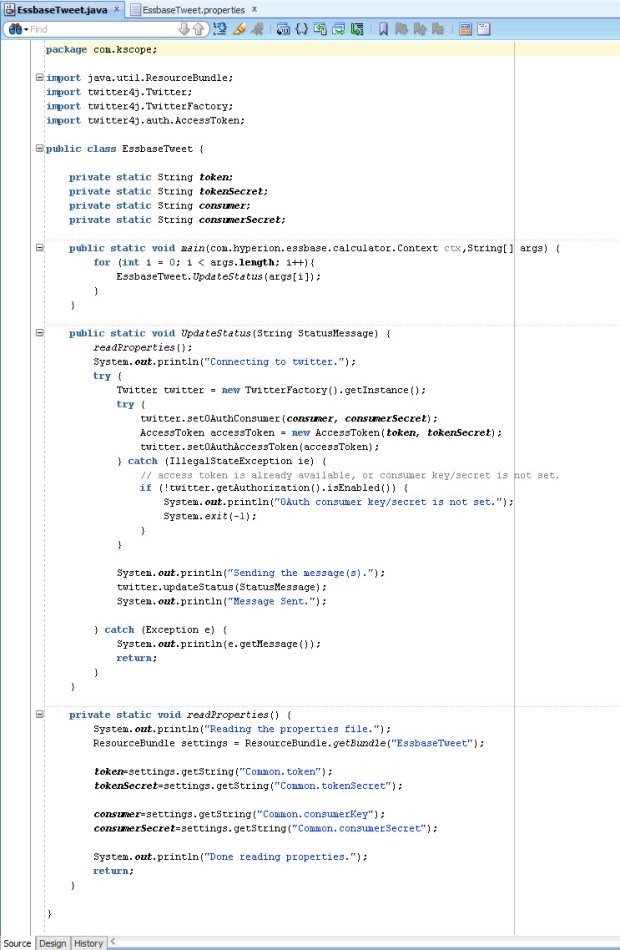
I did some searching and found Twitter4J, an unofficial Java library for the Twitter API. This library handles the OAuth authentication as well as allows submitting of new status updates, sending direct messages, searching tweets, etc. Between Matt’s original Twitter code, the Twitter4J sample code, and some trial and error, I was able to get the library setup and created a Java class that could send my tweets.

  1. The first step was to download the Twitter4J library.  I added the twitter4j-core-4.0.3.jar file into my lib folder in JDeveloper and added it to my classpath.
  2. Next, I had to setup a new Twitter account (EssbaseServer2).
  3. Then, I went to http://twitter.com/oauth_clients/new and setup my application to get the OAuth keys needed for my code to authenticate.
    TwitterApp
  4. Once I gathered the keys, I put them into a .properties file called “EssbasTweet.properties”.  This file will be placed onto my Essbase server into the %EOH%/products/Essbase/EssbaseServer/java/udf directory.  Placing the file into the …/java/udf directory puts it into Essbase’s Java classpath and Essbase will be able to access the file when its needed.
    propertiesFile
  5. Next, I wrote my code (based heavily on Twitter4J’s sample code), compiled it, deployed the code to a JAR and placed the JAR on the Essbase server.
    SourceCode
  6. I registered the CDF manually in EAS.
    RegisterCDF
  7. I was able to pretty much reuse Matt’s original calc script as he had it back in 2009 with the exception of using an @CalcMgr function instead of one of the older data functions.

Does it work? Well, go and check out the @EssbaseServer2 account for yourself.

While publicly tweeting your data might not be the best idea, hopefully this serves as a spark to ignite your imagination of the power of CDFs. Anything you can do in Java can be implemented in an Essbase calculation. Some attendees of my presentation were pretty excited about the possibilities of communicating with their users by submitting messages using Slack or updating a status on a SharePoint site. The possibilities are limited only by your imagination.

Thanks again to Matt for presenting on CDFs eight years ago. It definitely inspired me to learn more and hopefully this will inspire others to do the same.

There has been some uncertainty about the fate of CDFs with OAC and the Essbase cloud service, but never fear, CDFs are supported but they are limited to local CDFs. More on that in the future.

Calc Manager 11.1.2.4.010 Issue

I applied the Calc Manager 11.1.2.4.010 patch to a sandbox VM in anticipation of my upcoming Kscope presentation “Essbase CDFs Demystifyied.” As I was working on my CDF demos for this presentation, I found that the @CalcMgrMDXExport CDF was having an issue as my Essbase application started up:

[Thu Jun 15 12:45:49 2017]Local/Samp2///8632/Warning(1200490)
Wrong java method specification [com.hyperion.calcmgr.common.cdf.MDXExport.exportData(String,String,String,String,String,String,String,String,String,String,String,String,String,String,String)] (function [@CalcMgrMDXExport]): [specified method not found:com.hyperion.calcmgr.common.cdf.MDXExport::exportData(java.lang.String,java.lang.String,java.lang.String,java.lang.String,java.lang.String,java.lang.String,java.lang.String,java.lang.String,java.lang.String,java.lang.String,java.lang.String,java.lang.String,java.lang.String,java.lang.String,java.lang.String)]

This error is saying that the exportData method of the MDXExport class with 15 String input parameters is not valid. I peeked at the code and found that in 11.1.2.4.010, the exportData method is now looking for 19 String variables. It sounds like this was not planned, so we can look forward to a new @CalcMgrMDXExport-like CDF in the near future.

If you have already applied the Calc Manager 11.1.2.4.010 patch, you can apply a quick fix by changing the CDF registration and editing your calculation scripts to include four additional null strings at the end of your @CalcMgrMDXExport calls.

To fix the issue, you can run the following MaxL statement to register the CDF with the appropriate number of parameters:

create or replace function ‘@CalcMgrMDXExport’ as ‘com.hyperion.calcmgr.common.cdf.MDXExport.exportData(String,String,String,String,String,String,String,String,String,String,String,String,String,String,String,String,String,String,String)’ spec ‘@CalcMgrMDXExport(key,usr,pwd,file,app,db,svr,colAxs,rowAxs,sep,msg,Unique,Alias,supZero,rowHdrs,whereMDX,srcMap,tgtMap,supColH)’ with property runtime

I had to resort to shorthand on the “spec” field because Essbase only allows 128 bytes in that field if you register the CDFs through MaxL or EAS. I believe there may be more leeway for longer fields if you use the Java API to register CDFs.

After running the MaxL to register the CDF and restarting my application, it looks like all is well with the world:

[Thu Jun 15 15:47:08 2017]Local/Samp2///1960/Info(1200445)
External [GLOBAL] function [@CalcMgrMDXExport] registered OK

The additional fields needed for the @CalcMgrMDXExport method in this version of Calc Manager are as follows (in order):

  • String wheremdx
  • String srcMappings
  • String targetMappings
  • String supressColHeaders

The wheremdx field, if used, allows me to filter my results coming back from the source application. This field is optional and can be left null.

The srcMappings and targetMappings fields, if used, allow mapping members from source to target. This would allow me to map account 1234 to 4567 on the export by providing “1234” for the srcMappings field and “4567” in the targetMappings field. This field is also optional and can be left null.

The supressColHeaders accepts a string “true” or “yes” to suppress the column headers. Any other value (including null) will result in the output file containing the headers.

I have submitted an SR and expect a bug to be filed in the next few days. I’ll submit a new post once we have an updated Calc Manager patch that fixes this issue and includes a new @CalcMgr* CDF.

Do Oracle’s OOW cloud announcements signal the death of on-premises EPM?

This week at Oracle Open World, Oracle has announced more details around a few new EPM Cloud products (Essbase Cloud Services, PCMCS, and DMCS) in addition to their already existing stack of SaaS cloud services (PBCS, EPRCS, EPBCS, ARCS, and FCCS).
axeWith these new offerings added to their stable, is this the death of on-premises EPM as we know it?

Oracle’s stated direction of product strategy for the EPM products is to tap into unserved business users. EPM has been predominantly used by corporate finance departments from the beginning. At one point, Hyperion was marketed to CFOs and not CIOs because it could be run on an administrator’s computer under a desk without IT involvement. The evolution of EPM cloud is a return to the golden age of Essbase – easily created departmental applications that provide better analytic ability than Excel alone.

The EPM cloud products are really all about allowing easy adoption for non-traditional EPM users and providing rapid value to their customers. Spreadsheets still dominate at small to medium companies. The cloud offerings are really simplify life for those companies who struggle with maintaining servers and have a lack of technical skill at designing an optimized solution. With the EPM cloud products, it’s very easy to roll out a Workforce or CapEx application in EPBCS by sending out the URL and paying the monthly subscription fees. The cloud also allows the business users to be in the driver’s seat by not needing IT resources to get them up and running.

As we know, there is a long way to go yet on the EPM Cloud roadmap to get all of these products working well together. For instance, how exactly do we get data from our EPBCS application into ESSCS for additional reporting? How about my BICS dashboards using data from my ESSCS departmental cube or my PBCS budget data? It’s clear to see that with Oracle’s growth in the cloud and continued development of additional features and functions on the cloud products that these drawbacks will be remedied in time.

This whole cloud thing is just a fad, it will pass, right?

Even Mark Hurd stated during his keynote on Monday that the cloud is no fad, it’s a generational shift that is here to stay. Oracle has stated publicly that they fully intend to continue to support and develop EPM on-premises solutions. Matt Bradley, SVP for EPM and BI Development at Oracle, has said that Oracle expects most companies will enter into a hybrid cloud implementation if and/or when they decide to move their investments into the cloud. They have developed tools in DRM and FDMEE to support these hybrid cloud implementations. The shift to cloud computing is happening, but it doesn’t signal the immediate end of the line EPM on-premises. Once the cloud products have fully matured, there may continue to be valid use cases for on-premises EPM products going forward.

So, what is the future of my on-premises investment?

The market indicates that there is a healthy appetite for cloud solutions and all indications are that Oracle expects even large customers to eventually move their EPM investments to the cloud. While the on-premises products are still being developed, the availability of new on-premises versions has slowed down. For the last few years, we were blessed with several major releases of EPM software from 9.3.1 to 11.1.2.4. Oracle noted that the software release adoption cycle was about every two to three years, so we expect that the new software releases for on-premises will be more in line with those adoption cycles. We should expect to see some new features and functionality through Patch Set Updates to the latest code line in between major upgrades. Future on-premises releases will begin to showcase a simpler architecture to the components and focus on usability.

What should we do with our on-premises EPM environments now?

If you haven’t already upgraded to version 11.1.2.4, it is highly recommended. The 11.1.2.4 code line has some great features like better support for Essbase Hybrid Aggregation, improvements in HFM consolidations, FDMEE data synchronization between EPM applications, and the new Financial Reporting Web Studio. I have been on several calls with customers who are still working in old releases and the Classic Essbase add-in. It is time to move on and update those environments. If you have upgraded to version 11.1.2.4, it’s highly recommended to keep up with the latest Patch Set Updates on at least a quarterly basis. Sometimes applying the latest patches may cause some issues, so thorough testing of new patches is always recommended before implementing into production.

Staying on the latest release also allows companies to bridge from on-premises to cloud much easier. For example, as mentioned earlier FDMEE and DRM already support hybrid cloud implementations. Oracle has doubled-down at OOW 2016 on their assertion that cloud computing is the future. While on-premises EPM software isn’t going away any time soon, the cloud products are going to continue to mature rapidly. As the cloud products develop and integrations between them become more defined, more and more companies are going to see the benefits of moving their EPM investments into the cloud.

FDMEE and Essbase ASO clears

FDMEE to Essbase

Last month we covered FDMEE and Essbase (BSO) calculations. This month, let’s take a look at FDMEE integration with ASO. With BSO, we set up calculation scripts to do a clear before the data load and an aggregation after the load. With ASO, there are no calculation scripts so we can’t use the same functionality.

Partial clears in ASO can be done using MaxL, the Essbase scripting language. Those of you familiar with Essbase already know, an aggregation is not needed after the a data load to ASO as those cubes dynamically aggregate.

There are several ways to accomplish these clears, most of them revolve around using Event Scripts in FDMEE. Event Scripts are written in Jython or Visual Basic. Jython is an implementation of the Python programming language, designed to run on the Java platform. Jython is a more powerful language than VBA and it’s fairly easy to learn and work with, so that is what I use when writing Event Scripts.

We have many intervals in the FDMEE integration process where we can insert custom code into an Event Script. Each FDMEE process has a before and after script that can be customized. Since we want data to remain in our Essbase ASO application for as long as possible, we will use the BefLoad script to run our clear process.

It’s possible to call a batch file that will execute your MaxL script to run the clear, but I like to call MaxL directly from Jython. This method requires that the Essbase Client is installed on your FDMEE server so that the startMaxl.cmd script is available. Of course, we should be using encrypted MaxL scripts so that our passwords are not visible in either the Jython BefLoad.py script or in our MaxL script.

In this hypothetical situation, our Club Electronics stores in Delaware have submitted their ATM Sales. Lets say that Club Electronics submits a new file each day to update our ASOSamp application with the month-to-date sales numbers. To make sure that we are loading the correct data each time, we need to clear the existing Delaware ATM sales for Club Electronics for the current month and current year.

This scenario could be accomplished by hard coding values in for Delaware in MaxL, but we have other states that submit similar files using different locations in FDMEE. In order to make our clear script usable by multiple stores and entities, we can pass variables using Jython to MaxL to dynamically clear portions of our ASO cube based on the location (or data load rule, or integration option set in FDMEE, or many other variables).

So, let’s begin in FDMEE with our file integration using ASOSamp as our Target Application. I have already set up ASOSamp as a Target Application, created our Import Format for a comma delimited file, created our Location for Club Electronics ATM Sales (CE_ATM_Sales), and created the Data Load Rule to load this data.

MaxL Script

Our MaxL script accepts three parameters: Geography, Month, and Stores. We have our MaxL encrypted so that no passwords are stored in plain text. The trick to getting this to work, I have found, is using double quotes around the MDX expression in the MaxL statement. This allows MaxL to properly evaluate the variables. You can hard code some or all of the MDX tuple, I did a little of both here.

ASOSamp MaxL Clear.csv

Jython BefLoad.py Script

In the BefLoad script, we need to test and make sure that which FDMEE Location is being loaded to ensure we are running the proper code. This can test can also be done at the Load Rule level, if you have multiple rules in the same location. Next, the script calls startMaxl.cmd which is installed as part of the Essbase Client installation and passes the variables to the MaxL script.

ASOSamp BefLoad

Passing Variables

The trick to getting all of this to work is the ability to pass variables; either dynamic variables that come from FDMEE (Location name, POV month, etc.) or static variables that we have coded into the Jython script. In the example above, I show how to pass a variable with a space from Jython to MaxL. By escaping the double quote (“) with a backslash (\), we are able to pass the variable from Jython to the Windows Command prompt surrounded in double quotes (“).  Without the escape character, the variable will not get passed correctly.

Logs

In our FDMEE process logs, we can see that the code is running properly thanks to the fdmAPI.logInfo lines we added to the BefLoad script:

2016-07-22 17:53:11,871 INFO [AIF]: Executing the following script: C:\FDMEE/data/scripts/event/BefLoad.py
2016-07-22 17:53:11,923 INFO [AIF]: ======================================================================
2016-07-22 17:53:11,923 INFO [AIF]: BefLoad Script: Begin
2016-07-22 17:53:11,923 INFO [AIF]: ======================================================================
2016-07-22 17:53:11,923 INFO [AIF]: Submitting MaxL to selectively clear ASOSamp
2016-07-22 17:53:11,923 INFO [AIF]: ======================================================================
2016-07-22 17:53:13,141 INFO [AIF]: ======================================================================
2016-07-22 17:53:13,141 INFO [AIF]: MaxL commands to ASOSamp were successful
2016-07-22 17:53:13,141 INFO [AIF]: ======================================================================
2016-07-22 17:53:13,141 INFO [AIF]: BefLoad Script: END
2016-07-22 17:53:13,141 INFO [AIF]: ======================================================================
2016-07-22 17:53:14,825 INFO [AIF]: EssbaseService.loadData - START

In Essbase, we can also verify that the MaxL code is executing properly by checking the ASOSamp application log:

[Fri Jul 22 17:53:12 2016]Local/ASOsamp///6600/Info(1013210)
User [admin@Native Directory] set active on database [Sample]

[Fri Jul 22 17:53:12 2016]Local/ASOsamp///6544/Info(1042059)
Connected from [::1]

[Fri Jul 22 17:53:12 2016]Local/ASOsamp/Sample/admin@Native Directory/6544/Info(1013091)
Received Command [AsoClearRegion] from user [admin@Native Directory]

[Fri Jul 22 17:53:13 2016]Local/ASOsamp/Sample/admin@Native Directory/6544/Info(1270602)
Removed [25] cells from input view. Partial Data Clear Elapsed Time [0.258334] sec

[Fri Jul 22 17:53:13 2016]Local/ASOsamp/Sample/admin@Native Directory/6544/Info(1013273)
Database ASOSamp.Sample altered

[Fri Jul 22 17:53:13 2016]Local/ASOsamp///7080/Info(1013214)
Clear Active on User [admin@Native Directory] Instance [1]

With the ability to call MaxL directly as part of FDMEE scripts, your integration is only limited by your imagination. To take this post another step further, you might decide to update substitution variables in Essbase based on the FDMEE POV that is being loaded or maybe even build aggregate views using MaxL in the AftLoad.py script without much additional effort.

FDMEE and Essbase calculations

Since January, I have been on a project using FDMEE against Essbase and Planning applications. There are certainly many more companies using FDMEE with HFM, so I wanted to share some things I have learned about FDMEE and Essbase.

The topic of this post is about the process of running calculations in Essbase. Typically with Essbase data loads, especially repetitive loading of data during a close cycle, we will want to clear out the data first and then load in the new data. Of course, after that data loads to Essbase (BSO) we will likely need to run an aggregation after the load.

Lucky for us, Oracle baked in the ability to run calculations on your Essbase Target Applications at certain points during the load process. In this post, we will cover how to set up a clear script before a data load, but an aggregation script after the load is the same process with a different script.

First, we need an Essbase calculation script to run a CLEARDATA command. For this occasion, I wrote a quick little CLEARDATA script to clear out Sales in California for whatever period I happen to be running in FDMEE. I have saved the script in the Sample.Basic application as “fdmClear”.

SET CALCTASKDIMS 4;
SET CALCPARALLEL 4;
SET UPDATECALC OFF;

SET RUNTIMESUBVARS
{
POVPer = "";
};

FIX(&POVPer, "Sales", "California")

CLEARDATA Actual;

ENDFIX

Notice the use of RUNTIMESUBVARS for my POVPer variable. By defining these in our calculation script, FDMEE will be able to pick up the variable and pass a value when it runs the calc script.

To set up these calculations, we need to be on the Setup tab of FDMEE and have the Target Applications window up. If we switch to the Calculation Scripts tab, we can add our scripts.

EsbCalcs1

We need to click the Add button to set up our clear script. I have entered in the “fdmClear” name for the script and clicked on the pencil icon to add my calc script parameter. In the “Set Calculation Script Parameters” window, I clicked the magnifying glass icon. This forces FDMEE to look back at the calc script and pick up the POVPer variable.

EsbCalcs2

Now we have a choice as to what value to assign to our POVPer variable.  In our simple use case, we will use the POV Period option and click OK.

EsbCalcs3

Next, we can select the appropriate scope for the calculation. For instance, if we have a clear for this application and it only affects a particular slice of data, we would want to use a more granular scope like data rule or location. Script scopes with higher granularity override those with lower granularity. So, if we have multiple scripts with different scopes, the most granular one will take effect (data rule scope overrides a location scope, location scope overrides category scope, and category overrides application).

EsbCalcs4

For any selections other than Application, a Scope Entity box will appear and allow you to specify what rule, location, or category to use. I chose Location and selected my Loc1 sample location.

The next choice is to decide when to execute the calculation: before the data load, after the data load, before the check process or after the check process.  In my case, I selected Before Data Load.

EsbCalcs5

Finally, if we end up with multiple calculations with the same script scope, scope entity, and event, we can specify a Sequence value to order the calculations appropriately. I only have one calculation, so this is left null.

Calculation Script Parameters

I was curious if a regular substitution variable would work, so I created a Market subvar (mkt) on the Sample.Basic application and a Measures subvar (acct) as a global variable to test.

EsbCalcs6

EsbCalcs7

No dice. When we attempt to add our substitution variables in the parameter names window, FDMEE is only able to retrieve the RUNTIMESUBVARS defined within the script.

EsbCalcs8

Getting Started with FDMEE (for on-premises and hybrid cloud implementations)

Ever since Hyperion Application Link (HAL) died, people have looked for ways to help them load data and metadata into their Oracle EPM applications. ODI became a favorite tool of several developers due to its flexibility and ability to load to Essbase, Planning, and HFM. However, a complicated and in some cases very expensive licensing structure makes ODI less appealing today as it has been in the past for EPM practitioners.

You may be thinking, “But I get to use ODI for free with my Planning Plus/Financial Management Plus licenses.” That is true; however, according to the EPM Licensing Guide, the Restricted Use License for ODI only allows the use of the embedded agent within the ODI Studio. It does not allow for the use of standalone agents. Standalone agents are the key to running the ODI scheduler, so you are effectively limited to running your ODI scenarios manually from ODI Studio.

As you may know, FDMEE was released in the 11.1.2.3 version and has really blossomed in the 11.1.2.4 release.  As Oracle has stated on their road map, FDMEE will become the favored solution for loading data into and synchronizing data between EPM applications. That transition is well on its way.

So, let’s pretend that you are a customer who has “seen the light” and purchased FDMEE licenses (and at least one adapter license) and are now ready to implement. Where do you begin after installation?

Generating the System Folders

Setting up the FDMEE file structure should be one of the first things that you do in a new implementation of FDMEE.  This allows the importing of files into FDMEE and sets up all of the folders needed for FDMEE to work properly.

From inside FDMEE, click the Setup tab.

FDMEESetup1

Next, click the System Settings link on the left side.

FDMEESetup2

Enter your application root folder directory. C:\FDMEE is my directory on this sandbox VM as all of my products are deployed to one server. You may use a UNC path for the application root folder instead of an absolute path. Click on Create Application Folders.

FDMEESetup3

A confirmation message is displayed:

FDMEESetup4

Period Mapping

Before we get too excited about setting up source systems and target applications, I like to make sure that my POV has all of the required elements first. It’s pretty easy to forget the period or category mapping when we are first setting up FDMEE and then we’ll get all sorts of strange messages when trying to run our first integration.

Before setting up your period mapping, we need to take a look at the applications that we are going to be integrating with. What is the most granular period of time for all of your applications? Is it Monthly, Weekly, Daily, or something else entirely? The most granular period level determines how your Global Period Map is set up.

At a client of mine, they have one daily application, several monthly applications, and one yearly application.  That forces us to create a period mapping for every day in the Global Period Map. We then use an application mapping to choose the first of each month as a valid period for our monthly applications. The yearly application similarly has the first day in their fiscal calendar for each year in the application map.

In FDMEE 11.1.2.4, Oracle added the Excel Interface which allows us to download data from the FDMEE tables into Excel. This is a great way to fill out your Period Mapping data without painfully entering each day into the FDMEE interface. I will typically start by adding a couple of periods into the Period Map manually to seed it with some data before exporting it to Excel.

To seed the Period Map, select the Period Mapping link on the Setup tab in FDMEE.

FDMEESetup5

Click the Add button to add the period maps.

FDMEESetup6

Enter the appropriate data for the Target Period and Year Target columns. Click Save once complete.

FDMEESetup7

Notice the Period Name field is Month-Year. This is due to a not very well documented “feature” that requires Period Names to not include spaces if we are going to use the FDMEE batch script utilities to kick off data load rules.

To fill out the rest of FY16, let’s use the Excel Interface. Click on the Excel Interface link on the Setup tab of FDMEE.

FDMEESetup8

Open the Entity Type drop-down box and select Period Mapping.

FDMEESetup9

Enter a file name and click the Download button. FDMEE will append the .xls extension for you.

FDMEESetup10

The file will be saved in your FDMEE application folder location.

FDMEESetup11

Next, I will open the Period.xls file that I saved and drag the PERIODKEY column down to auto-fill the rest of FY16.

FDMEESetup12

I do the same for the other columns with data, but we ran into a problem with the text field PERIODDESC.

FDMEESetup13

To fix that, I write a quick formula using the TEXT() function to build the correct PERIODDESC based on the PERIODKEY field. These functions come in very handy if you are working with a daily Period Mapping table.

FDMEESetup14

Next, copy the formulas and paste the values over the incorrect PERIODDESC entries.

FDMEESetup15

The Excel Interface files have a named range in them that corresponds to the FDMEE repository table name. Any time that I have inserted records into a table like this, the range always seems to be thrown off. The last step is to fix the named range and make sure that it includes your newly added records.

In Excel, click on the FORMULAS ribbon and click the Name Manager button to edit the named range.

FDMEESetup16

Edit the range to include all of the data cells and the header records.

FDMEESetup17

Save your file back to the FDMEE application folder location. Now, we need to upload the file to FDMEE to insert our Period Mapping records.

On the Excel Interface page, under the “Upload From Excel” box, click the Select button to browse to our Period.xls file and click OK.

FDMEESetup18

Click the Upload button to upload the file. There is a log displayed on the Excel Interface screen that shows the status of your actions.

FDMEESetup19

Now, browsing back to the Period Mapping task, we can see that our periods were imported properly.

FDMEESetup20

Adding additional periods is an ongoing maintenance item that an FDMEE administrator will need to do periodically. The Excel interface only allows adding new data to the TPOVPERIOD table, it does not allow you to update existing data unfortunately.

Category Mapping

The final bit of setup for this post is the Category Mapping. The category maps are much less dynamic than the Period Mapping and usually will not require as much maintenance.

For the categories (or scenarios), I typically add them manually through the FDMEE user interface. Simply click on the Category Mapping task in the FDMEE Setup tab and add the categories (or scenarios) as needed. Here I created a Budget category that will map to the “Plan” dimension in my application.

FDMEESetup21

These are some of the first steps that I would typically take when getting started in FDMEE. For now, this is where I will leave you. There are many more things to do such as set up your source and target applications and create import formats, locations, data load rules, and data maps. The FDMEE administration guide is an excellent resource for the other tasks as well as scripting in Jython. I recommend bookmarking the EPM Documentation site it as you will use it often.