Data Integration

Who moved my Data Integration menu? Embracing change with Setup and Configure

In Dr. Spencer Johnson’s 1998 bestseller, Who Moved My Cheese?, four characters navigate a maze in search of cheese. The book’s main themes are that change is inevitable and that we must anticipate, adapt, and embrace it to be successful in work and life.

Fast forward to the 10.25 Oracle EPM update, and we find ourselves in a similar maze. This time, the “cheese” is the data management Action menu items. And yes, they are about to be moved.

The Data Integration home page has undergone a subtle but powerful transformation. The familiar Actions menu has been reorganized into two new dropdowns: Setup and Configure.
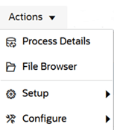
The Setup menu is where you define the structure of your data environment. Think of it as mapping your maze before you start running:

  • Applications: Define your integration targets and sources.
  • Locations: Create and maintain locations for mapping.
  • Period Mapping: Align time-based data across systems.
  • Category Mapping: Manage application scenarios.
  • Query: Setup and modify data source queries.

Once your maze is mapped, it’s time to optimize your tools and security. This is where the Configure menu comes in:

  • System Settings: Control the behavior of your integration engine.
  • Security Settings: Safeguard access and permissions.
  • Agent: Manage the EPM Integration Agent settings.
  • Download Agent: Get the EPM Integration Agent software.

Just like the characters in Who Moved My Cheese? learned to adapt to their new reality, this menu redesign helps users adapt to their data environment more efficiently. By grouping actions based on context, users can find what they need faster and act with greater confidence eventually. Those of us who have switched to using the Data Integration UI will take a little bit to get used to it, but I think this is a small quality of life change that we will come to appreciate.

This update applies across business processes including Account Reconciliation, Planning, Tax Reporting, and more.

In the end, the cheese will always move. The question is: will you move with it?

EPM Cloud 25.08 Updates – TLS, JRE, ARC Pipelines, Oh My

The EPM updates for 25.08 were released and we have an update to the TLS changes. Oracle has decided to continue supporting TLS 1.2 indefinitely, but only with ciphers deemed to be strong. The extension of support for TLS 1.2 gives Oracle and its customers a welcome bit of flexibility. Oracle has also released a document on how to test with the latest TLS ciphers document here: https://docs.oracle.com/en/cloud/saas/enterprise-performance-management-common/tsepm/cloud_epm_test_tls_ciphers.html

EPM Automate is switching to Java 17 instead of Java 8. Windows users rejoice! With the EPM Automate “update” command, EPM Automate will download and install the Java 17 runtime environment as part of the update process. Linux/Unix and Mac users will need to update their user-installed Java version to continue using EPM Automate 25.08 and after. Java 8 was released over ten years ago, so it’s good to see a newer version is being implemented. Linux/UNIX/Mac OSx users can go here to find how to update their Java version: https://docs.oracle.com/en/cloud/saas/enterprise-performance-management-common/cepma/installing_epm_automate_linux_unix.html

Account Reconciliation Cloud is getting Data Integration Pipelines with this update. Pipelines will be available on ARC pods with the following job types:

  • Create Reconciliation
  • Generate Report for Account Reconciliation
  • Import Attribute Values
  • Import Balances
  • Import Pre-Mapped Balances
  • Import Pre-Mapped Transactions
  • Import Rates
  • Run Auto Match
  • Run Auto Alert
  • Set Period Status

This should mean that we can define ARC jobs on any EPM Data Integration Pipeline and cross pods (similar to how we can run EDM exports across pods with Pipeline).

Before we go, I just wanted to take a moment to celebrate the deprecation of the Data Management/Data Integration job schedules. If anyone out there has braved the pain of that scheduler, those scheduled jobs need to be converted to the EPM Platform Job Scheduler before the 25.09 update. There is a System Maintenance Task job in Data Management called “Migrate Schedules to Platform Job Scheduler” to help with that effort. The EPM Job Scheduler isn’t available in PCM and ARC, unfortunately. If you use either of these business processes, scheduling outside using EPM Automate or rest calls is probably your best bet (and likely what most other customers are using anyways).

Smart Split feature in 25.07

New EPM Data Integration Features in 25.07

Oracle updates for the 25.07 patch just recently came out and there are a couple of great features for Data Integration in the mix this month.

First, a new application role called “Data Integration – Administrator” is rolling out. This access role will grant a user access to all activities in Data Integration. This means a user will be able to create/manage integrations, execute and monitor pipelines, and perform data and metadata extraction and transformation from on-premises sources using the EPM Integration Agent. The new role is a fantastic addition to allow a user to manage your integrations without giving them Service Administrator permissions on the rest of application. This applies to pretty much all EPM business processes including ARC, EPCM, FCC, Planning, PCM, and Tax Reporting.

The second update is the addition of the Smart Split feature in Pipeline. Basically, Essbase has a governor and it gets mad when you try to push too much data into it. The solution up to now has been to split a large volume data integration into multiple smaller slices of data to get around the limit. Going forward, we can set up a large integration like normal with one big data load rule. Then, in Pipeline we can add an “Integration with Smart Split” job which will split the files for us based on the Split Dimension specified. This will allow the system to bypass the governor to submit smaller data slices without requiring the creation of multiple integrations. Smart Split will be available in EPCM, FCC, Planning, and Tax Reporting

Check out the Proactive Support Blog update here for more information on all of the 25.07 updates: https://blogs.oracle.com/proactivesupportepm/post/oracle-planning-july-2025-cloud-updates

EPM Data Integration Copy Features

Just catching up after Kscope and I was going to write a quick blog post about the EPM Data Integration Copy Integration and Copy Pipeline features, but I was scooped.

These features were released in the 25.04 updates (April 2025), but I haven’t had a chance to use them yet and actually forgot it was a thing until Mike Casey talked about it at Kscope.

My friend Trey Daniel just happened to post about it five days ago on LinkedIn. Please check out his post on the subject here: https://www.linkedin.com/pulse/cross-pod-migrations-selected-oracle-epm-cloud-data-trey-daniel-mba-yglgc

One thing I didn’t realize was that it is possible to copy integrations and pipelines to other pods by using the connection feature. The EPM community is alive and well thanks to those who share their knowledge.