EDM

Testing out EDM’s GenAI Feature

Oracle continues to add AI to its SaaS offerings including Oracle EPM products. They have been releasing AI features since 2024. Just to recap on some of the EPM AI features currently available:

  • IPM Insights to generate a narrative summary on an insight or group of insights
  • PCM Agent to assist with workflow tasks
  • Narrative Reporting generative AI features for commentary within report packages
  • Advanced Predictions in Planning and FreeForm
  • Predictive Cash Forecasting
  • As of the 12.25 release, Oracle added the EDM application registration assistant to generate properties

I had a chance to test drive the EDM GenAI feature while building a prototype for a customer recently and it is amazing. This is my “Tom Cruise on the couch” moment for EDM.

<EDIT> I didn’t realize that was over 20 years ago, so some people may not get that reference. Please see https://knowyourmeme.com/memes/tom-cruise-jumps-on-oprahs-couch.

What’s the big deal?

If you’re not setting up a new application and are in maintenance mode in your applications, maybe you don’t even care about this update. But, if you’re prototyping a new app or thinking about expanding your EDM application into other master data domains like products, customers, vendors, things like that, this update saves a ton of time.

Building a custom application can involve some tedious work. Setting up each and every property takes a couple of minutes; you have to enter in the property name, identify the data type for the property, etc. But, with this generative AI application registration assistant, it can evaluate a .csv file of a bucket load of properties and the first 10 rows of data to identify the property names and data types for you. This came in handy for me with a customer’s data set that had 173 properties.

Enable AI

To get started using Generative AI in EDM, the first thing you need to do is enable the feature in the application Settings. Just check the box. No restart of the service is needed. That’s literally all there is to do.

Now that AI has been turned on, you’d expect some confetti on the screen or something, but nothing.

Is this thing on?

So, now that we have enabled AI how do I use this feature? Oracle’s docs say:

To generate properties using a sample file, you must be on the Properties for Dimension Node Type page. You access this page when you perform any of the following tasks:

Maybe it’s my midwestern, plain-speaking roots or something, but I couldn’t decipher that. So, my next step was to try and play with it to figure it out.

I went into the Node Type and played around in there with properties but didn’t see anything different.
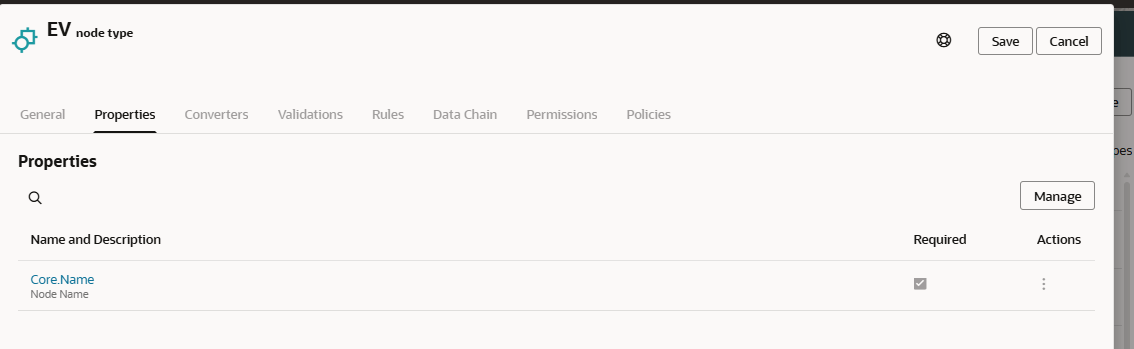
So, I tried to add a new Node Type from the Node Type card in the Information Model, but that didn’t allow me do anything different in the Properties window either.

Then, I went into the application by selecting Modify Registration and navigated into my Node Type that I was trying to edit.

Success!

I already gathered a data file with electric vehicle data (thanks Uncle Sam), so with that file in hand, I clicked on Generate to add my custom properties.


I clicked the “Drag and Drop” button and it allowed me to browse to find my EV file. The GenAI assistant reads the headers and the data rows to determine the Property Name and Data Type as well as suggest what level (Node or Relationship) the property should have. If you don’t like what it selected, click the Edit button to change the values.

In my case, I wanted my VIN property to be the Name. I tried to tell the application this is my Name, but as you may have noticed in the earlier pictures, the Name property already exists. In this case, I used the Actions “delete” icon to remove that property.

Next, I noticed things like Postal Code and Model Year were set to Integer. I didn’t want the system to try and put commas as thousands separator in those fields, so I changed them to Numeric String. Of course, with any AI usage, there should be a human in the loop to ensure that AI is handling things properly.

After clicking Save, and finishing up my Modify Registration wizard, I could see the properties were built in my Node Type.

Lessons Learned

File preparation can go a long ways in saving you time fixing some AI mistakes here. You want to have 10 or so rows of sample data so the system can determine the Data Type and Level for the properties. Your headers should be labeled how you want them to appear in EDM and you can specify your property order in the file as well. Adding prefixes to your properties and clustering them together might make it easier when you create property groups as well.

As you can see, this GenAI feature is assistive, not automation. It provided a great deal of time savings to me as a developer, but I can’t blindly trust the system to choose the correct data types for each property. This feature accelerates setup, but doesn’t replace design. It’s still important to define naming standards as you can see with the long names from my data file.

While this is dramatically faster than building all properties from scratch, we still need to plan for multiple refinement cycles and time to adjust those AI-generated properties.

This new GenAI assistant is ideal for new applications or domain onboarding in EDM. This could help out with new implementations, when doing M&A activity, re-platforming enterprise data, or metadata rationalization projects.


Oracle EDM team drops a massive amount of updates for the 26.04 release

With the first calendar quarter of 2026 in the books, Oracle is ready to resume the monthly update schedule for EPM applications. Since we haven’t had a normal update schedule for a few months, the EDM development team has a backlog of updates that will finally be automatically pushed this month. The descriptions of the features are on Oracle’s site and you can find that link at the bottom if you haven’t seen it already.

Spotlight Features:

In the EDM list of spotlight features from Oracle we see the following:

  • A generative AI assistant is now available within Universal application registration to quickly create and configure properties for node types based on sample data files.
  • Hierarchy viewpoints can now be optionally visualized in an organization chart format rather than the standard tree format used by default.
  • Global connections can now be defined to Microsoft Azure Blob Storage in order to share data with external applications and processes from a centralized storage location in a Microsoft Azure cloud environment.
Gen AI Assistant:

This sounds like a very cool feature to help speed up the development process. My take is that EDM build phases can sometimes be a little tedious with all of the clicks needed to wire things up correctly, so this is a good first start to try and streamline that process. This is obviously a first iteration, so I’m excited for the future when you can just point EDM to an FCC or Planning application and have the AI assistant read the dimensionality and then you can choose which dimensions to set up in EDM. On top of that, just imagine you can say to an AI assistant, “I have this ERP system here’s a file with my segments. Here’s the URL for my EPM application. Build two EDM apps for the metadata management and create a mapping viewpoint to manage the data integration maps as well.”

Viewpoints in Tree format:

I have seen this functionality and I am used to seeing things in the default visualization so that makes more sense to my brain. I’ll have to play around with the tree view to see how useful it will be for me.

Azure Blob Storage connection:

Azure Blob Storage connection is a great addition. This especially makes sense as more and more organizations are seeing the benefit of using EDM for non-financial domains. At a prior employer, we were mastering employee roles that were fed into Azure Blob Storage which eventually fed HR systems. The ability to send an extract direct to Azure Blob Storage will streamline that process and make some of the automations created using EPM Automate and WinSCP unnecessary. It will streamline the integrations which is a win in my book.

Other Updates:

New Validations for FCC applications:

There are some new validations that will be added to FCC applications for the Account dimension. These will be enabled by default on new EDM FCC applications, but need to be manually enabled on existing applications. These will replace some custom validations that customers have created. It’s great to see that some of the features that customers have asked for in the Cloud Customer Connect Idea Lab coming into reality.

Address verification:

When importing addresses, customers with Oracle’s address verification service can ensure that good addresses are loaded into EDM from the beginning. Data cleanliness is very important when mastering Customer or Supplier dimensions, so this is a great addition to the product.

OAuth2 Authentication for Oracle cloud ERP and Financials connections

OAuth token based authentication is preferred for most IT shops since it doesn’t require maintaining a password. This is great news that token authentication is being implemented more and more across the Oracle stack.


Of course, these are just my opinions. If you have a different perspective, I’d love to hear it. Sharing knowledge is one of my core values and as the saying goes, a rising tide raises all boats.

References:

Oracle EPM April 2026 What’s New: https://docs.oracle.com/en/cloud/saas/readiness/epm/2026/epm-apr26/26apr-epm-wn-f44078.htm


EDM 25.09 Update – Request Monitoring Dashboard

In the September 2025 udpate (25.09), Oracle is adding a Request Monitoring Dashboard to EDM! Designed to enhance visibility and control over change requests, this dashboard empowers administrators, data stewards, and integration leads to streamline workflows and improve data quality across the enterprise.

The Request Monitoring Dashboard is a centralized interface that allows users to track and analyze open requests throughout their lifecycle. Whether you’re managing metadata changes, hierarchy updates, or complex multi-domain governance processes, this dashboard offers real-time insights into request activity, aging, bottlenecks, and contributor performance.

Key Features:

  • Lifecycle Tracking: Monitor requests by type, priority, workflow stage, and assigned contributors.
  • Custom Filters: Apply and save filters to focus on specific request attributes.
  • Dashboards:
    • Open Requests: View volume and distribution.
    • Active Owners: Identify who’s driving change.
    • Aging and Exceptions: Spot delays and anomalies.
  • Drilldowns & Drill-Across: Dive deep into request details or pivot to related metrics.
  • Export Capability: Download request activity for offline analysis or stakeholder sharing.
Request Monitoring Dashboard displaying open requests, active owners, aging, and exceptions. Features include request count by stage, open request distribution by application, and a snapshot of outstanding requests.
Sample Request Monitoring Dashboard image courtesy of Oracle

Why It Matters:

Managing change requests efficiently is critical to maintaining data integrity and operational agility. The dashboard helps teams:

  • Reduce request cycle time
  • Identify and resolve workflow bottlenecks
  • Improve exception handling
  • Enhance collaboration across business units

The Request Monitoring Dashboard isn’t just a new feature—it’s a strategic tool for proactive governance. By surfacing actionable insights and enabling smarter oversight, the Oracle EDM dev team continues to raise the bar for enterprise data management.

To find out more about this release, see the August 21 Oracle EPM Event by Rahul Kamath and Matt Lontchar here: https://community.oracle.com/customerconnect/events/606792-epm-whats-new-and-whats-coming-in-oracle-enterprise-data-management-edm-cloud

The EDM 25.09 features list can be found here: https://docs.oracle.com/en/cloud/saas/readiness/epm/2025/edm-sep25/25sep-edmcs-wn-f40991.htm