EPM Cloud 25.08 Updates – TLS, JRE, ARC Pipelines, Oh My

The EPM updates for 25.08 were released and we have an update to the TLS changes. Oracle has decided to continue supporting TLS 1.2 indefinitely, but only with ciphers deemed to be strong. The extension of support for TLS 1.2 gives Oracle and its customers a welcome bit of flexibility. Oracle has also released a document on how to test with the latest TLS ciphers document here: https://docs.oracle.com/en/cloud/saas/enterprise-performance-management-common/tsepm/cloud_epm_test_tls_ciphers.html

EPM Automate is switching to Java 17 instead of Java 8. Windows users rejoice! With the EPM Automate “update” command, EPM Automate will download and install the Java 17 runtime environment as part of the update process. Linux/Unix and Mac users will need to update their user-installed Java version to continue using EPM Automate 25.08 and after. Java 8 was released over ten years ago, so it’s good to see a newer version is being implemented. Linux/UNIX/Mac OSx users can go here to find how to update their Java version: https://docs.oracle.com/en/cloud/saas/enterprise-performance-management-common/cepma/installing_epm_automate_linux_unix.html

Account Reconciliation Cloud is getting Data Integration Pipelines with this update. Pipelines will be available on ARC pods with the following job types:

  • Create Reconciliation
  • Generate Report for Account Reconciliation
  • Import Attribute Values
  • Import Balances
  • Import Pre-Mapped Balances
  • Import Pre-Mapped Transactions
  • Import Rates
  • Run Auto Match
  • Run Auto Alert
  • Set Period Status

This should mean that we can define ARC jobs on any EPM Data Integration Pipeline and cross pods (similar to how we can run EDM exports across pods with Pipeline).

Before we go, I just wanted to take a moment to celebrate the deprecation of the Data Management/Data Integration job schedules. If anyone out there has braved the pain of that scheduler, those scheduled jobs need to be converted to the EPM Platform Job Scheduler before the 25.09 update. There is a System Maintenance Task job in Data Management called “Migrate Schedules to Platform Job Scheduler” to help with that effort. The EPM Job Scheduler isn’t available in PCM and ARC, unfortunately. If you use either of these business processes, scheduling outside using EPM Automate or rest calls is probably your best bet (and likely what most other customers are using anyways).

Oracle EPM AI features deliver on promises from long ago

I have accepted the fact that I am getting old (or is it “more experienced”?). At this point, I have been working on and around Oracle EPM products for almost twenty years. In the early 2000s, I was getting data from Hyperion Enterprise before we installed Essbase to do reporting. I dove into Essbase and began learning as much as I could. Once I reached a point where I felt I had done everything I could at my position as an administrator, I moved into consulting in 2010 to continue developing myself and learning more. As part of that, I took some training on OBIEE to help support customers with BI installs.

My point is, for 15+ years (maybe 20) EPM and BI users have heard about the promise of self-service BI: empowering users to analyze and visualize data independently. I remember hearing this in my OBIEE training and it was exciting to think about users digging into the data to answer business questions.

The thing with BI products is that there has to be someone technical to connect all of the data sources on the back end. It takes a special someone to figure out the right strings to pull to get all of those data sources normalized and linked up so that end users can do their reporting and analysis. It may be my bias as an implementer, but I don’t know how far users go past the initial dashboards that get created. I certainly hope it’s more common than I have seen.

As I sat in the Kscope Sunday Symposium presentations by Oracle product management and heard about all of the AI features coming to Oracle EPM, it dawned on me that all of the amazing things that I imagined 15 years ago will soon be possible and more accessible than ever. Users will soon be able to to chat with the AI built into Oracle EPM products and get visualizations fed back to them. To recycle an old sales pitch, analysis at the speed of thought is about to be real.

I am looking forward to seeing the developments in Oracle EPM products and I’m excited to see what our customers do with them. You can find the current AI features available in Oracle EPM products here: https://docs.oracle.com/en/cloud/saas/fusion-ai/aiafl/epm-features-with-ai.html. That list is about to get much longer. These are exciting times we live in.

Smart Split feature in 25.07

New EPM Data Integration Features in 25.07

Oracle updates for the 25.07 patch just recently came out and there are a couple of great features for Data Integration in the mix this month.

First, a new application role called “Data Integration – Administrator” is rolling out. This access role will grant a user access to all activities in Data Integration. This means a user will be able to create/manage integrations, execute and monitor pipelines, and perform data and metadata extraction and transformation from on-premises sources using the EPM Integration Agent. The new role is a fantastic addition to allow a user to manage your integrations without giving them Service Administrator permissions on the rest of application. This applies to pretty much all EPM business processes including ARC, EPCM, FCC, Planning, PCM, and Tax Reporting.

The second update is the addition of the Smart Split feature in Pipeline. Basically, Essbase has a governor and it gets mad when you try to push too much data into it. The solution up to now has been to split a large volume data integration into multiple smaller slices of data to get around the limit. Going forward, we can set up a large integration like normal with one big data load rule. Then, in Pipeline we can add an “Integration with Smart Split” job which will split the files for us based on the Split Dimension specified. This will allow the system to bypass the governor to submit smaller data slices without requiring the creation of multiple integrations. Smart Split will be available in EPCM, FCC, Planning, and Tax Reporting

Check out the Proactive Support Blog update here for more information on all of the 25.07 updates: https://blogs.oracle.com/proactivesupportepm/post/oracle-planning-july-2025-cloud-updates

EPM Data Integration Copy Features

Just catching up after Kscope and I was going to write a quick blog post about the EPM Data Integration Copy Integration and Copy Pipeline features, but I was scooped.

These features were released in the 25.04 updates (April 2025), but I haven’t had a chance to use them yet and actually forgot it was a thing until Mike Casey talked about it at Kscope.

My friend Trey Daniel just happened to post about it five days ago on LinkedIn. Please check out his post on the subject here: https://www.linkedin.com/pulse/cross-pod-migrations-selected-oracle-epm-cloud-data-trey-daniel-mba-yglgc

One thing I didn’t realize was that it is possible to copy integrations and pipelines to other pods by using the connection feature. The EPM community is alive and well thanks to those who share their knowledge.

UPDATE: TLS 1.2 Deprecation Testing

After the 25.06 update was released, I did a quick test of a Windows 10 VM with Smart View and EPM Automate. The concern was that TLS 1.3 is supported only on Windows Server 2022 and Windows 11 and that our customers on older versions of Windows may have issues.

The test consisted of a Hyper-V Windows 10 Enterprise Evaluation VM with MS Office 365 installed. Using a test pod with the Vision Planning sample app installed, I tried to get in and start testing around 5:30 PM CDT (22:30 UTC) but the update wasn’t pushed yet. I tried a couple of times to run the “epmautomate rundailymaintenance” command to force the update, but no luck. After 6:00 PM CDT, I tried the rundailymaintenance again and it worked.

My Smart View ad-hoc template retrieved data just fine. Similarly, EPM Automate logged in after the update and told me it needed an upgrade. I ran the upgrade command and logged out. Even after the upgrade, EPM Automate logged in just fine.

Looks like a big nothing burger, which is the best result for us all. This was a test of end user tools, so I would still recommend all of you out there in EPM land to thoroughly test after this update just to make sure everything is good.

The coming TLS-pocalypse?

On Friday, June 6, 2025, the June (25.06) update will be released. Since at least April, Oracle has been communicating that TLS 1.2 will be deprecated in favor of TLS 1.3. Transport Layer Security is used to encrypt data transfers between computers, like between your company laptop and the Oracle EPM Cloud server. TLS 1.3 has stronger encryption algorithms to safeguard that data so it makes sense that we need to update to the later standard.

Browsers have supported TLS 1.2 and 1.3 for quite some time, so no worries there. There is some ambiguity in Oracle’s statement that causes me some concern, though. In the June Update, we have the following:

Transport Layer Security (TLS) protocol version 1.2 is no longer used for connections to Oracle Fusion Cloud EPM environments; all connections are made over TLS 1.3 only. This change requires you to use a browser that supports TLS 1.3. Additionally, you need to ensure that the operating system and EPM Clients (such as EPM Automate, Smart View, and EPM Agent) that you use support TLS 1.3. The newest version of EPM Clients, and many previous versions, already support TLS 1.3.
If you integrate on-premises EPM instances with Fusion Cloud EPM using Financial Data Quality Management Enterprise Edition (FDMEE), make sure to use FDMEE version 11.2.7 or newer because older versions do not support TLS 1.3.

Over the last 15 years, I think 80% or more of my work at customers has been done on Windows client machines and servers. Many times, customers have implemented their corporate standard OS version which might not be the latest available at the time of installation. Given that information, the third sentence of the Oracle Update notes seems to indicate that the OS also needs to support TLS 1.3.

After searching on some Microsoft sites, it seems that the only flavors of Windows to support TLS 1.3 are Windows 11 and Windows Server 2022. The concern is that customers who sometimes are a little slower to adopt new technology may experience issues trying to integrate with EPM Cloud products if they are on Windows 10 or older Windows Server versions that don’t support TLS 1.3. Customers who use FDMEE on-premises instead of the EPM Integration Agent still will also want to ensure their FDMEE has been upgraded to at least 11.2.7.

We will see what happens Friday night. Hopefully it’s as non-eventful as my New Year’s Eve in 1999.

Dusting this thing off…

I read a blog post this morning by someone known as “raf,” titled The Curse of Knowing How, or; Fixing Everything, that has inspired me to share my own thoughts on the subject. Several themes from the post resonated deeply with me, especially based on my experiences in Oracle EPM and integration development over the course of my consulting career:

  • Knowing which problems are worth your energy.
  • Knowing which projects are worth maintaining.
  • Knowing when you’re building to help—and when you’re building to cope.
  • Knowing when to stop.

Early in my career, I was used to being a self-sufficient application administrator and had just enough programming knowledge to be dangerous. My first instinct was always to code my way through integration challenges.

Before I even got into Hyperion/Oracle EPM administration, I worked as an admin for a PDF report bursting tool called DocumentDirect for the Internet by Mobius Software (now owned by Rocket Software). One of our recurring challenges was maintaining monthly security updates for sensitive commission reports as managers changed roles.

To solve this, I built a quick Java application that took an HCM report and generated an XML file, which we could upload to update security roles each month. This saved a ton of time and ensured consistent role updates. It was efficient and effective—but ultimately short-lived.

The problem? I wasn’t part of IT. I was in a shadow-IT role within the Financial Systems department, reporting up through the Controller and CFO. No one else on the finance team had the technical chops to maintain what I had built. So when I left the company, my slick little Java app effectively died with me.

When I moved into EPM consulting, I brought that same mindset to client engagements. I could write elegant Python or Java solutions to streamline integration processes and save time. The downside? Many clients didn’t have the resources or the technical depth to maintain the black boxes we consultants left behind.

It takes a more mature mindset to recognize the risks of this approach. If your code breaks a year or two down the line (especially during a critical close cycle) and no one can fix it, that’s not innovation. That’s failure.

This is why the “KISS” principle (“Keep It Simple, Stupid”) can be essential in integration work. Sure, we can create all kinds of sophisticated solutions in Oracle EPM using event scripts and custom reports on integration tables. But before I do anything like that, I need to know that the client can support the customization. Additionally, the implementation partner is committed to writing the most complete, user-friendly documentation imaginable.

My goal is to share some wisdom that was given to me early in my career. It took me years to truly understand the “why” behind that advice. Hopefully, by sharing this, I can help flatten someone else’s learning curve.

Kim Kardashian can get my Essbase server updates

I had the great pleasure of presenting at Kscope17 on the power of Essbase CDFs.  At the end of my CDF presentation this year, I gave a live demonstration of a little CDF that is designed to spark the imagination.

In 2009, Matt Milella presented on CDFs at Kaleidoscope and talked about the top 5 CDFs that his team had created.  At the end, he showed a very cool demonstration of how his Essbase server could send out a tweet using a CDF. This was an amazing display and really inspired me to figure out how to create CDFs.

So, as an homage to Matt’s blog post about how Ashton Kutcher can get his Essbase server updates, I have created an updated version of the Twitter CDF. As Matt states, he used JTwitter back in 2009.  Unfortunately for me, Twitter has long since changed their authentication to use OAuth for security which means that JTwitter doesn’t work anymore.

I did some searching and found Twitter4J, an unofficial Java library for the Twitter API. This library handles the OAuth authentication as well as allows submitting of new status updates, sending direct messages, searching tweets, etc. Between Matt’s original Twitter code, the Twitter4J sample code, and some trial and error, I was able to get the library setup and created a Java class that could send my tweets.

  1. The first step was to download the Twitter4J library.  I added the twitter4j-core-4.0.3.jar file into my lib folder in JDeveloper and added it to my classpath.
  2. Next, I had to setup a new Twitter account (EssbaseServer2).
  3. Then, I went to http://twitter.com/oauth_clients/new and setup my application to get the OAuth keys needed for my code to authenticate.
    TwitterApp
  4. Once I gathered the keys, I put them into a .properties file called “EssbasTweet.properties”.  This file will be placed onto my Essbase server into the %EOH%/products/Essbase/EssbaseServer/java/udf directory.  Placing the file into the …/java/udf directory puts it into Essbase’s Java classpath and Essbase will be able to access the file when its needed.
    propertiesFile
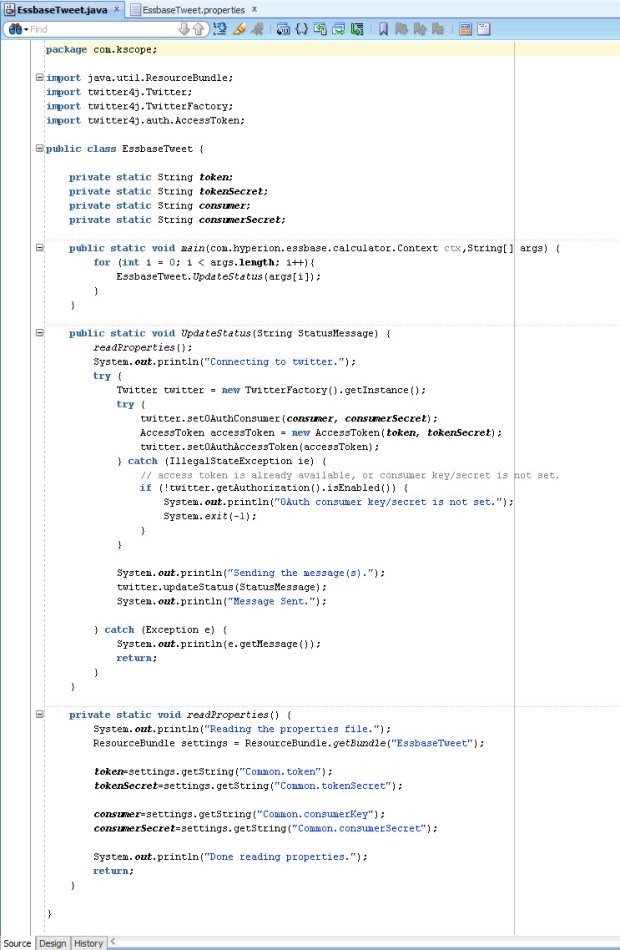
  5. Next, I wrote my code (based heavily on Twitter4J’s sample code), compiled it, deployed the code to a JAR and placed the JAR on the Essbase server.
    SourceCode
  6. I registered the CDF manually in EAS.
    RegisterCDF
  7. I was able to pretty much reuse Matt’s original calc script as he had it back in 2009 with the exception of using an @CalcMgr function instead of one of the older data functions.

Does it work? Well, go and check out the @EssbaseServer2 account for yourself.

While publicly tweeting your data might not be the best idea, hopefully this serves as a spark to ignite your imagination of the power of CDFs. Anything you can do in Java can be implemented in an Essbase calculation. Some attendees of my presentation were pretty excited about the possibilities of communicating with their users by submitting messages using Slack or updating a status on a SharePoint site. The possibilities are limited only by your imagination.

Thanks again to Matt for presenting on CDFs eight years ago. It definitely inspired me to learn more and hopefully this will inspire others to do the same.

There has been some uncertainty about the fate of CDFs with OAC and the Essbase cloud service, but never fear, CDFs are supported but they are limited to local CDFs. More on that in the future.

OAC Backup issue

I have found myself between projects for a couple of weeks which has given me a great opportunity to get hands-on with interRel’s OAC instance. It has been great to crawl around it, kick the tires, and get my hands dirty under the hood, so to speak.

One of the things we had issues with was running a backup at the service level. In OAC, there are two types of backups – service level and application level. The service backup is a full backup of all the runtime artifacts required to restore the service, such as the WebLogic domain, service instance details, and any metadata associated with your service. Basically, it’s like a snapshot of the VM that gets saved to your cloud storage instance (one of the prerequisites of OAC).

As I was playing with OAC and trying to figure out how to administer the product, I noticed that a monthly patch was available. Before applying the patch, I decided to take a service backup just to be safe in case anything happened during the patch.

From the OAC dashboard, I selected Administration. Then on the backup tab, I selected Backup Now.

OAC Backup Now

After 30 minutes or so, I came back to find out that my backup had failed. I attempted to run the patch anyway, but it does a backup first as well and so it failed again.

Eventually, I ended up submitting an SR with Oracle for help. Within about an hour or so, Oracle Support determined that it was likely that when we created our OAC database cloud instance that the USERS tablespace was not created.

My friend and co-worker, Wayne Van Sluys (http://beyond-just-data.blogspot.com/), ran into this issue at one of our OAC clients as well. Wayne sent over the information that I needed to get connected to our DBaaS instance via Oracle SQL Developer.

When you create an OAC service, one of the prerequisites is setting up the DBaaS service. The connection information you will need is accessible from the Database Cloud Service console. The Public IP address and connection string on the Service Overview page gives you what you need to know along with your “sys” schema name and password.

DBaaS connection info

In addition to this information, you also need to edit the Access Rules for the DBCS service to allow connections from outside on port 1521. I enabled this Access Rule for the service while I made the change.

DBaaS access rules

In SQL Developer, I was then able to set up the connection to our DBCS instance.

SQL Developer connection

With the connection made, I could then submit the SQL code to add the USERS tablespace using the “CREATE TABLESPACE” command. I will leave it to the reader to consult a DBA on the command and what options you should supply with the command.

After creating the USERS tablespace, the backups are now running successfully and I was able to apply the latest patch to our OAC environment.

Success

Success!

Calc Manager 11.1.2.4.010 Issue

I applied the Calc Manager 11.1.2.4.010 patch to a sandbox VM in anticipation of my upcoming Kscope presentation “Essbase CDFs Demystifyied.” As I was working on my CDF demos for this presentation, I found that the @CalcMgrMDXExport CDF was having an issue as my Essbase application started up:

[Thu Jun 15 12:45:49 2017]Local/Samp2///8632/Warning(1200490)
Wrong java method specification [com.hyperion.calcmgr.common.cdf.MDXExport.exportData(String,String,String,String,String,String,String,String,String,String,String,String,String,String,String)] (function [@CalcMgrMDXExport]): [specified method not found:com.hyperion.calcmgr.common.cdf.MDXExport::exportData(java.lang.String,java.lang.String,java.lang.String,java.lang.String,java.lang.String,java.lang.String,java.lang.String,java.lang.String,java.lang.String,java.lang.String,java.lang.String,java.lang.String,java.lang.String,java.lang.String,java.lang.String)]

This error is saying that the exportData method of the MDXExport class with 15 String input parameters is not valid. I peeked at the code and found that in 11.1.2.4.010, the exportData method is now looking for 19 String variables. It sounds like this was not planned, so we can look forward to a new @CalcMgrMDXExport-like CDF in the near future.

If you have already applied the Calc Manager 11.1.2.4.010 patch, you can apply a quick fix by changing the CDF registration and editing your calculation scripts to include four additional null strings at the end of your @CalcMgrMDXExport calls.

To fix the issue, you can run the following MaxL statement to register the CDF with the appropriate number of parameters:

create or replace function ‘@CalcMgrMDXExport’ as ‘com.hyperion.calcmgr.common.cdf.MDXExport.exportData(String,String,String,String,String,String,String,String,String,String,String,String,String,String,String,String,String,String,String)’ spec ‘@CalcMgrMDXExport(key,usr,pwd,file,app,db,svr,colAxs,rowAxs,sep,msg,Unique,Alias,supZero,rowHdrs,whereMDX,srcMap,tgtMap,supColH)’ with property runtime

I had to resort to shorthand on the “spec” field because Essbase only allows 128 bytes in that field if you register the CDFs through MaxL or EAS. I believe there may be more leeway for longer fields if you use the Java API to register CDFs.

After running the MaxL to register the CDF and restarting my application, it looks like all is well with the world:

[Thu Jun 15 15:47:08 2017]Local/Samp2///1960/Info(1200445)
External [GLOBAL] function [@CalcMgrMDXExport] registered OK

The additional fields needed for the @CalcMgrMDXExport method in this version of Calc Manager are as follows (in order):

  • String wheremdx
  • String srcMappings
  • String targetMappings
  • String supressColHeaders

The wheremdx field, if used, allows me to filter my results coming back from the source application. This field is optional and can be left null.

The srcMappings and targetMappings fields, if used, allow mapping members from source to target. This would allow me to map account 1234 to 4567 on the export by providing “1234” for the srcMappings field and “4567” in the targetMappings field. This field is also optional and can be left null.

The supressColHeaders accepts a string “true” or “yes” to suppress the column headers. Any other value (including null) will result in the output file containing the headers.

I have submitted an SR and expect a bug to be filed in the next few days. I’ll submit a new post once we have an updated Calc Manager patch that fixes this issue and includes a new @CalcMgr* CDF.