Author: Robert Gideon

EPM/BI Consultant specializing in Infrastructure and support.

Smart Split feature in 25.07

New EPM Data Integration Features in 25.07

Oracle updates for the 25.07 patch just recently came out and there are a couple of great features for Data Integration in the mix this month.

First, a new application role called “Data Integration – Administrator” is rolling out. This access role will grant a user access to all activities in Data Integration. This means a user will be able to create/manage integrations, execute and monitor pipelines, and perform data and metadata extraction and transformation from on-premises sources using the EPM Integration Agent. The new role is a fantastic addition to allow a user to manage your integrations without giving them Service Administrator permissions on the rest of application. This applies to pretty much all EPM business processes including ARC, EPCM, FCC, Planning, PCM, and Tax Reporting.

The second update is the addition of the Smart Split feature in Pipeline. Basically, Essbase has a governor and it gets mad when you try to push too much data into it. The solution up to now has been to split a large volume data integration into multiple smaller slices of data to get around the limit. Going forward, we can set up a large integration like normal with one big data load rule. Then, in Pipeline we can add an “Integration with Smart Split” job which will split the files for us based on the Split Dimension specified. This will allow the system to bypass the governor to submit smaller data slices without requiring the creation of multiple integrations. Smart Split will be available in EPCM, FCC, Planning, and Tax Reporting

Check out the Proactive Support Blog update here for more information on all of the 25.07 updates: https://blogs.oracle.com/proactivesupportepm/post/oracle-planning-july-2025-cloud-updates

EPM Data Integration Copy Features

Just catching up after Kscope and I was going to write a quick blog post about the EPM Data Integration Copy Integration and Copy Pipeline features, but I was scooped.

These features were released in the 25.04 updates (April 2025), but I haven’t had a chance to use them yet and actually forgot it was a thing until Mike Casey talked about it at Kscope.

My friend Trey Daniel just happened to post about it five days ago on LinkedIn. Please check out his post on the subject here: https://www.linkedin.com/pulse/cross-pod-migrations-selected-oracle-epm-cloud-data-trey-daniel-mba-yglgc

One thing I didn’t realize was that it is possible to copy integrations and pipelines to other pods by using the connection feature. The EPM community is alive and well thanks to those who share their knowledge.

UPDATE: TLS 1.2 Deprecation Testing

After the 25.06 update was released, I did a quick test of a Windows 10 VM with Smart View and EPM Automate. The concern was that TLS 1.3 is supported only on Windows Server 2022 and Windows 11 and that our customers on older versions of Windows may have issues.

The test consisted of a Hyper-V Windows 10 Enterprise Evaluation VM with MS Office 365 installed. Using a test pod with the Vision Planning sample app installed, I tried to get in and start testing around 5:30 PM CDT (22:30 UTC) but the update wasn’t pushed yet. I tried a couple of times to run the “epmautomate rundailymaintenance” command to force the update, but no luck. After 6:00 PM CDT, I tried the rundailymaintenance again and it worked.

My Smart View ad-hoc template retrieved data just fine. Similarly, EPM Automate logged in after the update and told me it needed an upgrade. I ran the upgrade command and logged out. Even after the upgrade, EPM Automate logged in just fine.

Looks like a big nothing burger, which is the best result for us all. This was a test of end user tools, so I would still recommend all of you out there in EPM land to thoroughly test after this update just to make sure everything is good.

The coming TLS-pocalypse?

On Friday, June 6, 2025, the June (25.06) update will be released. Since at least April, Oracle has been communicating that TLS 1.2 will be deprecated in favor of TLS 1.3. Transport Layer Security is used to encrypt data transfers between computers, like between your company laptop and the Oracle EPM Cloud server. TLS 1.3 has stronger encryption algorithms to safeguard that data so it makes sense that we need to update to the later standard.

Browsers have supported TLS 1.2 and 1.3 for quite some time, so no worries there. There is some ambiguity in Oracle’s statement that causes me some concern, though. In the June Update, we have the following:

Transport Layer Security (TLS) protocol version 1.2 is no longer used for connections to Oracle Fusion Cloud EPM environments; all connections are made over TLS 1.3 only. This change requires you to use a browser that supports TLS 1.3. Additionally, you need to ensure that the operating system and EPM Clients (such as EPM Automate, Smart View, and EPM Agent) that you use support TLS 1.3. The newest version of EPM Clients, and many previous versions, already support TLS 1.3.
If you integrate on-premises EPM instances with Fusion Cloud EPM using Financial Data Quality Management Enterprise Edition (FDMEE), make sure to use FDMEE version 11.2.7 or newer because older versions do not support TLS 1.3.

Over the last 15 years, I think 80% or more of my work at customers has been done on Windows client machines and servers. Many times, customers have implemented their corporate standard OS version which might not be the latest available at the time of installation. Given that information, the third sentence of the Oracle Update notes seems to indicate that the OS also needs to support TLS 1.3.

After searching on some Microsoft sites, it seems that the only flavors of Windows to support TLS 1.3 are Windows 11 and Windows Server 2022. The concern is that customers who sometimes are a little slower to adopt new technology may experience issues trying to integrate with EPM Cloud products if they are on Windows 10 or older Windows Server versions that don’t support TLS 1.3. Customers who use FDMEE on-premises instead of the EPM Integration Agent still will also want to ensure their FDMEE has been upgraded to at least 11.2.7.

We will see what happens Friday night. Hopefully it’s as non-eventful as my New Year’s Eve in 1999.

Dusting this thing off…

I read a blog post this morning by someone known as “raf,” titled The Curse of Knowing How, or; Fixing Everything, that has inspired me to share my own thoughts on the subject. Several themes from the post resonated deeply with me, especially based on my experiences in Oracle EPM and integration development over the course of my consulting career:

  • Knowing which problems are worth your energy.
  • Knowing which projects are worth maintaining.
  • Knowing when you’re building to help—and when you’re building to cope.
  • Knowing when to stop.

Early in my career, I was used to being a self-sufficient application administrator and had just enough programming knowledge to be dangerous. My first instinct was always to code my way through integration challenges.

Before I even got into Hyperion/Oracle EPM administration, I worked as an admin for a PDF report bursting tool called DocumentDirect for the Internet by Mobius Software (now owned by Rocket Software). One of our recurring challenges was maintaining monthly security updates for sensitive commission reports as managers changed roles.

To solve this, I built a quick Java application that took an HCM report and generated an XML file, which we could upload to update security roles each month. This saved a ton of time and ensured consistent role updates. It was efficient and effective—but ultimately short-lived.

The problem? I wasn’t part of IT. I was in a shadow-IT role within the Financial Systems department, reporting up through the Controller and CFO. No one else on the finance team had the technical chops to maintain what I had built. So when I left the company, my slick little Java app effectively died with me.

When I moved into EPM consulting, I brought that same mindset to client engagements. I could write elegant Python or Java solutions to streamline integration processes and save time. The downside? Many clients didn’t have the resources or the technical depth to maintain the black boxes we consultants left behind.

It takes a more mature mindset to recognize the risks of this approach. If your code breaks a year or two down the line (especially during a critical close cycle) and no one can fix it, that’s not innovation. That’s failure.

This is why the “KISS” principle (“Keep It Simple, Stupid”) can be essential in integration work. Sure, we can create all kinds of sophisticated solutions in Oracle EPM using event scripts and custom reports on integration tables. But before I do anything like that, I need to know that the client can support the customization. Additionally, the implementation partner is committed to writing the most complete, user-friendly documentation imaginable.

My goal is to share some wisdom that was given to me early in my career. It took me years to truly understand the “why” behind that advice. Hopefully, by sharing this, I can help flatten someone else’s learning curve.

Kim Kardashian can get my Essbase server updates

I had the great pleasure of presenting at Kscope17 on the power of Essbase CDFs.  At the end of my CDF presentation this year, I gave a live demonstration of a little CDF that is designed to spark the imagination.

In 2009, Matt Milella presented on CDFs at Kaleidoscope and talked about the top 5 CDFs that his team had created.  At the end, he showed a very cool demonstration of how his Essbase server could send out a tweet using a CDF. This was an amazing display and really inspired me to figure out how to create CDFs.

So, as an homage to Matt’s blog post about how Ashton Kutcher can get his Essbase server updates, I have created an updated version of the Twitter CDF. As Matt states, he used JTwitter back in 2009.  Unfortunately for me, Twitter has long since changed their authentication to use OAuth for security which means that JTwitter doesn’t work anymore.

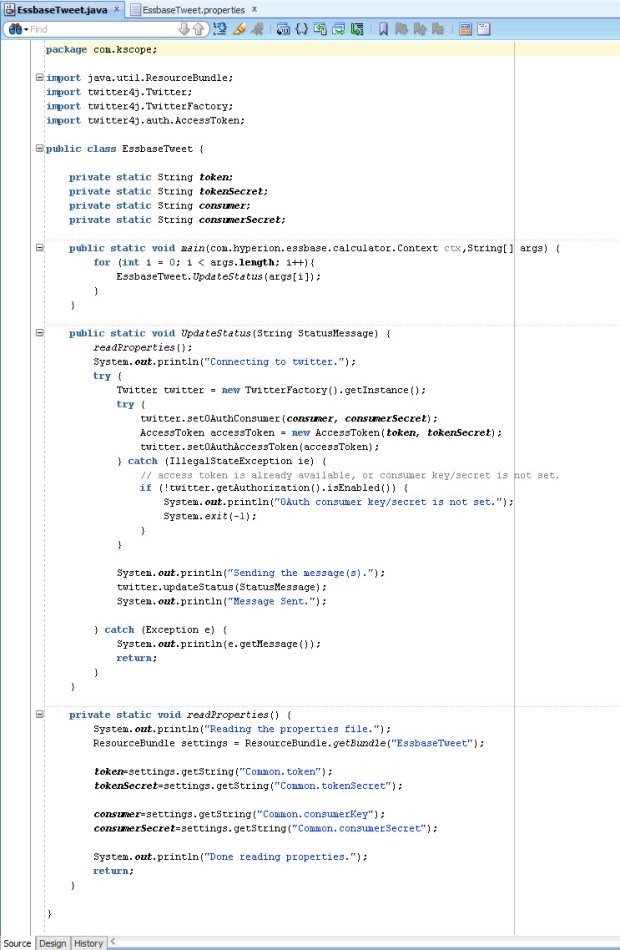
I did some searching and found Twitter4J, an unofficial Java library for the Twitter API. This library handles the OAuth authentication as well as allows submitting of new status updates, sending direct messages, searching tweets, etc. Between Matt’s original Twitter code, the Twitter4J sample code, and some trial and error, I was able to get the library setup and created a Java class that could send my tweets.

  1. The first step was to download the Twitter4J library.  I added the twitter4j-core-4.0.3.jar file into my lib folder in JDeveloper and added it to my classpath.
  2. Next, I had to setup a new Twitter account (EssbaseServer2).
  3. Then, I went to http://twitter.com/oauth_clients/new and setup my application to get the OAuth keys needed for my code to authenticate.
    TwitterApp
  4. Once I gathered the keys, I put them into a .properties file called “EssbasTweet.properties”.  This file will be placed onto my Essbase server into the %EOH%/products/Essbase/EssbaseServer/java/udf directory.  Placing the file into the …/java/udf directory puts it into Essbase’s Java classpath and Essbase will be able to access the file when its needed.
    propertiesFile
  5. Next, I wrote my code (based heavily on Twitter4J’s sample code), compiled it, deployed the code to a JAR and placed the JAR on the Essbase server.
    SourceCode
  6. I registered the CDF manually in EAS.
    RegisterCDF
  7. I was able to pretty much reuse Matt’s original calc script as he had it back in 2009 with the exception of using an @CalcMgr function instead of one of the older data functions.

Does it work? Well, go and check out the @EssbaseServer2 account for yourself.

While publicly tweeting your data might not be the best idea, hopefully this serves as a spark to ignite your imagination of the power of CDFs. Anything you can do in Java can be implemented in an Essbase calculation. Some attendees of my presentation were pretty excited about the possibilities of communicating with their users by submitting messages using Slack or updating a status on a SharePoint site. The possibilities are limited only by your imagination.

Thanks again to Matt for presenting on CDFs eight years ago. It definitely inspired me to learn more and hopefully this will inspire others to do the same.

There has been some uncertainty about the fate of CDFs with OAC and the Essbase cloud service, but never fear, CDFs are supported but they are limited to local CDFs. More on that in the future.

OAC Backup issue

I have found myself between projects for a couple of weeks which has given me a great opportunity to get hands-on with interRel’s OAC instance. It has been great to crawl around it, kick the tires, and get my hands dirty under the hood, so to speak.

One of the things we had issues with was running a backup at the service level. In OAC, there are two types of backups – service level and application level. The service backup is a full backup of all the runtime artifacts required to restore the service, such as the WebLogic domain, service instance details, and any metadata associated with your service. Basically, it’s like a snapshot of the VM that gets saved to your cloud storage instance (one of the prerequisites of OAC).

As I was playing with OAC and trying to figure out how to administer the product, I noticed that a monthly patch was available. Before applying the patch, I decided to take a service backup just to be safe in case anything happened during the patch.

From the OAC dashboard, I selected Administration. Then on the backup tab, I selected Backup Now.

OAC Backup Now

After 30 minutes or so, I came back to find out that my backup had failed. I attempted to run the patch anyway, but it does a backup first as well and so it failed again.

Eventually, I ended up submitting an SR with Oracle for help. Within about an hour or so, Oracle Support determined that it was likely that when we created our OAC database cloud instance that the USERS tablespace was not created.

My friend and co-worker, Wayne Van Sluys (http://beyond-just-data.blogspot.com/), ran into this issue at one of our OAC clients as well. Wayne sent over the information that I needed to get connected to our DBaaS instance via Oracle SQL Developer.

When you create an OAC service, one of the prerequisites is setting up the DBaaS service. The connection information you will need is accessible from the Database Cloud Service console. The Public IP address and connection string on the Service Overview page gives you what you need to know along with your “sys” schema name and password.

DBaaS connection info

In addition to this information, you also need to edit the Access Rules for the DBCS service to allow connections from outside on port 1521. I enabled this Access Rule for the service while I made the change.

DBaaS access rules

In SQL Developer, I was then able to set up the connection to our DBCS instance.

SQL Developer connection

With the connection made, I could then submit the SQL code to add the USERS tablespace using the “CREATE TABLESPACE” command. I will leave it to the reader to consult a DBA on the command and what options you should supply with the command.

After creating the USERS tablespace, the backups are now running successfully and I was able to apply the latest patch to our OAC environment.

Success

Success!

Calc Manager 11.1.2.4.010 Issue

I applied the Calc Manager 11.1.2.4.010 patch to a sandbox VM in anticipation of my upcoming Kscope presentation “Essbase CDFs Demystifyied.” As I was working on my CDF demos for this presentation, I found that the @CalcMgrMDXExport CDF was having an issue as my Essbase application started up:

[Thu Jun 15 12:45:49 2017]Local/Samp2///8632/Warning(1200490)
Wrong java method specification [com.hyperion.calcmgr.common.cdf.MDXExport.exportData(String,String,String,String,String,String,String,String,String,String,String,String,String,String,String)] (function [@CalcMgrMDXExport]): [specified method not found:com.hyperion.calcmgr.common.cdf.MDXExport::exportData(java.lang.String,java.lang.String,java.lang.String,java.lang.String,java.lang.String,java.lang.String,java.lang.String,java.lang.String,java.lang.String,java.lang.String,java.lang.String,java.lang.String,java.lang.String,java.lang.String,java.lang.String)]

This error is saying that the exportData method of the MDXExport class with 15 String input parameters is not valid. I peeked at the code and found that in 11.1.2.4.010, the exportData method is now looking for 19 String variables. It sounds like this was not planned, so we can look forward to a new @CalcMgrMDXExport-like CDF in the near future.

If you have already applied the Calc Manager 11.1.2.4.010 patch, you can apply a quick fix by changing the CDF registration and editing your calculation scripts to include four additional null strings at the end of your @CalcMgrMDXExport calls.

To fix the issue, you can run the following MaxL statement to register the CDF with the appropriate number of parameters:

create or replace function ‘@CalcMgrMDXExport’ as ‘com.hyperion.calcmgr.common.cdf.MDXExport.exportData(String,String,String,String,String,String,String,String,String,String,String,String,String,String,String,String,String,String,String)’ spec ‘@CalcMgrMDXExport(key,usr,pwd,file,app,db,svr,colAxs,rowAxs,sep,msg,Unique,Alias,supZero,rowHdrs,whereMDX,srcMap,tgtMap,supColH)’ with property runtime

I had to resort to shorthand on the “spec” field because Essbase only allows 128 bytes in that field if you register the CDFs through MaxL or EAS. I believe there may be more leeway for longer fields if you use the Java API to register CDFs.

After running the MaxL to register the CDF and restarting my application, it looks like all is well with the world:

[Thu Jun 15 15:47:08 2017]Local/Samp2///1960/Info(1200445)
External [GLOBAL] function [@CalcMgrMDXExport] registered OK

The additional fields needed for the @CalcMgrMDXExport method in this version of Calc Manager are as follows (in order):

  • String wheremdx
  • String srcMappings
  • String targetMappings
  • String supressColHeaders

The wheremdx field, if used, allows me to filter my results coming back from the source application. This field is optional and can be left null.

The srcMappings and targetMappings fields, if used, allow mapping members from source to target. This would allow me to map account 1234 to 4567 on the export by providing “1234” for the srcMappings field and “4567” in the targetMappings field. This field is also optional and can be left null.

The supressColHeaders accepts a string “true” or “yes” to suppress the column headers. Any other value (including null) will result in the output file containing the headers.

I have submitted an SR and expect a bug to be filed in the next few days. I’ll submit a new post once we have an updated Calc Manager patch that fixes this issue and includes a new @CalcMgr* CDF.

Do Oracle’s OOW cloud announcements signal the death of on-premises EPM?

This week at Oracle Open World, Oracle has announced more details around a few new EPM Cloud products (Essbase Cloud Services, PCMCS, and DMCS) in addition to their already existing stack of SaaS cloud services (PBCS, EPRCS, EPBCS, ARCS, and FCCS).
axeWith these new offerings added to their stable, is this the death of on-premises EPM as we know it?

Oracle’s stated direction of product strategy for the EPM products is to tap into unserved business users. EPM has been predominantly used by corporate finance departments from the beginning. At one point, Hyperion was marketed to CFOs and not CIOs because it could be run on an administrator’s computer under a desk without IT involvement. The evolution of EPM cloud is a return to the golden age of Essbase – easily created departmental applications that provide better analytic ability than Excel alone.

The EPM cloud products are really all about allowing easy adoption for non-traditional EPM users and providing rapid value to their customers. Spreadsheets still dominate at small to medium companies. The cloud offerings are really simplify life for those companies who struggle with maintaining servers and have a lack of technical skill at designing an optimized solution. With the EPM cloud products, it’s very easy to roll out a Workforce or CapEx application in EPBCS by sending out the URL and paying the monthly subscription fees. The cloud also allows the business users to be in the driver’s seat by not needing IT resources to get them up and running.

As we know, there is a long way to go yet on the EPM Cloud roadmap to get all of these products working well together. For instance, how exactly do we get data from our EPBCS application into ESSCS for additional reporting? How about my BICS dashboards using data from my ESSCS departmental cube or my PBCS budget data? It’s clear to see that with Oracle’s growth in the cloud and continued development of additional features and functions on the cloud products that these drawbacks will be remedied in time.

This whole cloud thing is just a fad, it will pass, right?

Even Mark Hurd stated during his keynote on Monday that the cloud is no fad, it’s a generational shift that is here to stay. Oracle has stated publicly that they fully intend to continue to support and develop EPM on-premises solutions. Matt Bradley, SVP for EPM and BI Development at Oracle, has said that Oracle expects most companies will enter into a hybrid cloud implementation if and/or when they decide to move their investments into the cloud. They have developed tools in DRM and FDMEE to support these hybrid cloud implementations. The shift to cloud computing is happening, but it doesn’t signal the immediate end of the line EPM on-premises. Once the cloud products have fully matured, there may continue to be valid use cases for on-premises EPM products going forward.

So, what is the future of my on-premises investment?

The market indicates that there is a healthy appetite for cloud solutions and all indications are that Oracle expects even large customers to eventually move their EPM investments to the cloud. While the on-premises products are still being developed, the availability of new on-premises versions has slowed down. For the last few years, we were blessed with several major releases of EPM software from 9.3.1 to 11.1.2.4. Oracle noted that the software release adoption cycle was about every two to three years, so we expect that the new software releases for on-premises will be more in line with those adoption cycles. We should expect to see some new features and functionality through Patch Set Updates to the latest code line in between major upgrades. Future on-premises releases will begin to showcase a simpler architecture to the components and focus on usability.

What should we do with our on-premises EPM environments now?

If you haven’t already upgraded to version 11.1.2.4, it is highly recommended. The 11.1.2.4 code line has some great features like better support for Essbase Hybrid Aggregation, improvements in HFM consolidations, FDMEE data synchronization between EPM applications, and the new Financial Reporting Web Studio. I have been on several calls with customers who are still working in old releases and the Classic Essbase add-in. It is time to move on and update those environments. If you have upgraded to version 11.1.2.4, it’s highly recommended to keep up with the latest Patch Set Updates on at least a quarterly basis. Sometimes applying the latest patches may cause some issues, so thorough testing of new patches is always recommended before implementing into production.

Staying on the latest release also allows companies to bridge from on-premises to cloud much easier. For example, as mentioned earlier FDMEE and DRM already support hybrid cloud implementations. Oracle has doubled-down at OOW 2016 on their assertion that cloud computing is the future. While on-premises EPM software isn’t going away any time soon, the cloud products are going to continue to mature rapidly. As the cloud products develop and integrations between them become more defined, more and more companies are going to see the benefits of moving their EPM investments into the cloud.

FDMEE and Essbase ASO clears

FDMEE to Essbase

Last month we covered FDMEE and Essbase (BSO) calculations. This month, let’s take a look at FDMEE integration with ASO. With BSO, we set up calculation scripts to do a clear before the data load and an aggregation after the load. With ASO, there are no calculation scripts so we can’t use the same functionality.

Partial clears in ASO can be done using MaxL, the Essbase scripting language. Those of you familiar with Essbase already know, an aggregation is not needed after the a data load to ASO as those cubes dynamically aggregate.

There are several ways to accomplish these clears, most of them revolve around using Event Scripts in FDMEE. Event Scripts are written in Jython or Visual Basic. Jython is an implementation of the Python programming language, designed to run on the Java platform. Jython is a more powerful language than VBA and it’s fairly easy to learn and work with, so that is what I use when writing Event Scripts.

We have many intervals in the FDMEE integration process where we can insert custom code into an Event Script. Each FDMEE process has a before and after script that can be customized. Since we want data to remain in our Essbase ASO application for as long as possible, we will use the BefLoad script to run our clear process.

It’s possible to call a batch file that will execute your MaxL script to run the clear, but I like to call MaxL directly from Jython. This method requires that the Essbase Client is installed on your FDMEE server so that the startMaxl.cmd script is available. Of course, we should be using encrypted MaxL scripts so that our passwords are not visible in either the Jython BefLoad.py script or in our MaxL script.

In this hypothetical situation, our Club Electronics stores in Delaware have submitted their ATM Sales. Lets say that Club Electronics submits a new file each day to update our ASOSamp application with the month-to-date sales numbers. To make sure that we are loading the correct data each time, we need to clear the existing Delaware ATM sales for Club Electronics for the current month and current year.

This scenario could be accomplished by hard coding values in for Delaware in MaxL, but we have other states that submit similar files using different locations in FDMEE. In order to make our clear script usable by multiple stores and entities, we can pass variables using Jython to MaxL to dynamically clear portions of our ASO cube based on the location (or data load rule, or integration option set in FDMEE, or many other variables).

So, let’s begin in FDMEE with our file integration using ASOSamp as our Target Application. I have already set up ASOSamp as a Target Application, created our Import Format for a comma delimited file, created our Location for Club Electronics ATM Sales (CE_ATM_Sales), and created the Data Load Rule to load this data.

MaxL Script

Our MaxL script accepts three parameters: Geography, Month, and Stores. We have our MaxL encrypted so that no passwords are stored in plain text. The trick to getting this to work, I have found, is using double quotes around the MDX expression in the MaxL statement. This allows MaxL to properly evaluate the variables. You can hard code some or all of the MDX tuple, I did a little of both here.

ASOSamp MaxL Clear.csv

Jython BefLoad.py Script

In the BefLoad script, we need to test and make sure that which FDMEE Location is being loaded to ensure we are running the proper code. This can test can also be done at the Load Rule level, if you have multiple rules in the same location. Next, the script calls startMaxl.cmd which is installed as part of the Essbase Client installation and passes the variables to the MaxL script.

ASOSamp BefLoad

Passing Variables

The trick to getting all of this to work is the ability to pass variables; either dynamic variables that come from FDMEE (Location name, POV month, etc.) or static variables that we have coded into the Jython script. In the example above, I show how to pass a variable with a space from Jython to MaxL. By escaping the double quote (“) with a backslash (\), we are able to pass the variable from Jython to the Windows Command prompt surrounded in double quotes (“).  Without the escape character, the variable will not get passed correctly.

Logs

In our FDMEE process logs, we can see that the code is running properly thanks to the fdmAPI.logInfo lines we added to the BefLoad script:

2016-07-22 17:53:11,871 INFO [AIF]: Executing the following script: C:\FDMEE/data/scripts/event/BefLoad.py
2016-07-22 17:53:11,923 INFO [AIF]: ======================================================================
2016-07-22 17:53:11,923 INFO [AIF]: BefLoad Script: Begin
2016-07-22 17:53:11,923 INFO [AIF]: ======================================================================
2016-07-22 17:53:11,923 INFO [AIF]: Submitting MaxL to selectively clear ASOSamp
2016-07-22 17:53:11,923 INFO [AIF]: ======================================================================
2016-07-22 17:53:13,141 INFO [AIF]: ======================================================================
2016-07-22 17:53:13,141 INFO [AIF]: MaxL commands to ASOSamp were successful
2016-07-22 17:53:13,141 INFO [AIF]: ======================================================================
2016-07-22 17:53:13,141 INFO [AIF]: BefLoad Script: END
2016-07-22 17:53:13,141 INFO [AIF]: ======================================================================
2016-07-22 17:53:14,825 INFO [AIF]: EssbaseService.loadData - START

In Essbase, we can also verify that the MaxL code is executing properly by checking the ASOSamp application log:

[Fri Jul 22 17:53:12 2016]Local/ASOsamp///6600/Info(1013210)
User [admin@Native Directory] set active on database [Sample]

[Fri Jul 22 17:53:12 2016]Local/ASOsamp///6544/Info(1042059)
Connected from [::1]

[Fri Jul 22 17:53:12 2016]Local/ASOsamp/Sample/admin@Native Directory/6544/Info(1013091)
Received Command [AsoClearRegion] from user [admin@Native Directory]

[Fri Jul 22 17:53:13 2016]Local/ASOsamp/Sample/admin@Native Directory/6544/Info(1270602)
Removed [25] cells from input view. Partial Data Clear Elapsed Time [0.258334] sec

[Fri Jul 22 17:53:13 2016]Local/ASOsamp/Sample/admin@Native Directory/6544/Info(1013273)
Database ASOSamp.Sample altered

[Fri Jul 22 17:53:13 2016]Local/ASOsamp///7080/Info(1013214)
Clear Active on User [admin@Native Directory] Instance [1]

With the ability to call MaxL directly as part of FDMEE scripts, your integration is only limited by your imagination. To take this post another step further, you might decide to update substitution variables in Essbase based on the FDMEE POV that is being loaded or maybe even build aggregate views using MaxL in the AftLoad.py script without much additional effort.